Skip to content

GRUB

๐Ÿ‘พ GRUB Invaders: Because Bootloaders Deserve to Have Fun Too

You know how you can make your bootloader sing a little tune?
Wellโ€ฆ what if instead of music, you could make it play Space Invaders?

Yes, thatโ€™s a real thing.
Itโ€™s called GRUB Invaders, and it runs before your operating system even wakes up.
Because who needs Linux when you can blast aliens straight from your BIOS screen? ๐Ÿš€


๐ŸŽถ From Tunes to Lasers

In a previous post โ€” โ€œResurrecting My Windows Partition After 4 Years ๐Ÿ–ฅ๏ธ๐ŸŽฎโ€ โ€”
I fell down a delightful rabbit hole while editing my GRUB configuration.
Thatโ€™s where I discovered GRUB_INIT_TUNE, spent hours turning my PC speaker into an 80s arcade machine, and learned far more about bootloader acoustics than anyone should. ๐Ÿ˜…

So naturally, the next logical step was obvious:
if GRUB can play music, surely it can play games too.
Enter: GRUB Invaders. ๐Ÿ‘พ๐Ÿ’ฅ


๐Ÿงฉ What the Heck Is GRUB Invaders?

grub-invaders is a multiboot-compliant kernel game โ€” basically, a program that GRUB can launch like itโ€™s an OS.
Except itโ€™s not Linux, not BSD, not anything remotely usefulโ€ฆ
itโ€™s a tiny Space Invaders clone that runs on bare metal.

To install it (on Ubuntu or Debian derivatives):

sudo apt install grub-invaders

Then, in GRUBโ€™s boot menu, itโ€™ll show up as GRUB Invaders.
Pick it, hit Enter, and bam! โ€” no kernel, no systemd, just pew-pew-pew.
Your CPU becomes a glorified arcade cabinet. ๐Ÿ•น๏ธ

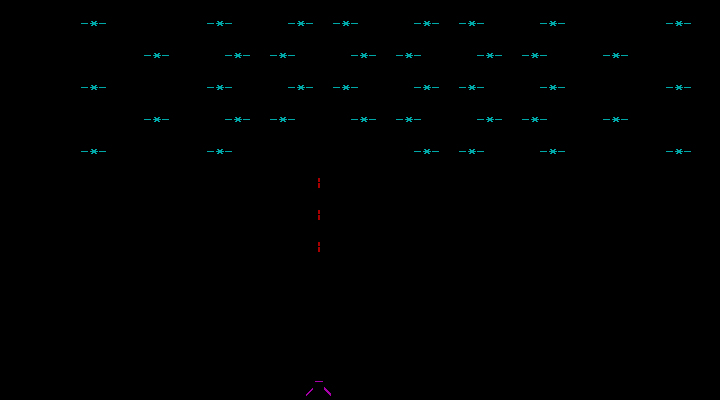
Image: https://libregamewiki.org/GRUB_Invaders

๐Ÿ› ๏ธ How It Works

Under the hood, GRUB Invaders is a multiboot kernel image (yep, same format as Linux).
That means GRUB can load it into memory, set up registers, and jump straight into its entry point.

Thereโ€™s no OS, no drivers โ€” just BIOS interrupts, VGA mode, and a lot of clever 8-bit trickery.
Basically: the game runs in real mode, paints directly to video memory, and uses the keyboard interrupt for controls.
Itโ€™s a beautiful reminder that once upon a time, you could build a whole game in a few kilobytes.


๐Ÿงฎ Technical Nostalgia

Installed size?

Installed-Size: 30
Size: 8726 bytes

Yes, you read that right: under 9 KB.
Thatโ€™s less than one PNG icon on your desktop.
Yet itโ€™s fully playable โ€” proof that programmers in the โ€™80s had sorcery weโ€™ve since forgotten. ๐Ÿง™โ€โ™‚๏ธ

The package is ancient but still maintained enough to live in the Ubuntu repositories:

Homepage: http://www.erikyyy.de/invaders/
Maintainer: Debian Games Team
Enhances: grub2-common

So you can still apt install it in 2025, and it just works.


๐Ÿง  Why Bother?

Because you can.

Because sometimes itโ€™s nice to remember that your bootloader isnโ€™t just a boring chunk of C code parsing configs.
Itโ€™s a tiny virtual machine, capable of loading kernels, playing music, and โ€” if youโ€™re feeling chaotic โ€” defending the Earth from pixelated aliens before breakfast. โ˜•

Itโ€™s also a wonderful conversation starter at tech meetups:

โ€œOh, my GRUB doesnโ€™t just boot Linux. It plays Space Invaders. What does yours do?โ€


โš™๏ธ A Note on Shenanigans

Donโ€™t worry โ€” GRUB Invaders doesnโ€™t modify your boot process or mess with your partitions.
Itโ€™s launched manually, like any other GRUB entry.
When youโ€™re done, reboot, and youโ€™re back to your normal OS.
Totally safe. (Mostly. Unless you lose track of time blasting aliens.)


๐Ÿ TL;DR

  • grub-invaders lets you play Space Invaders in GRUB.
  • Itโ€™s under 9 KB, runs without an OS, and is somehow still in Ubuntu repos.
  • Totally useless. Totally delightful.
  • Perfect for when you want to flex your inner 8-bit gremlin.
๐ŸŽต The Secret Soundtrack of GRUB: Making Your Bootloader Sing

So, you know that feeling when youโ€™re editing GRUB for the thousandth time, because dual-booting is apparently a lifestyle choice?
In a previous post โ€” Resurrecting My Windows Partition After 4 Years ๐Ÿ–ฅ๏ธ๐ŸŽฎ โ€” I was neck-deep in grub.cfg, poking at boot entries, fixing UUIDs, and generally performing a ritual worthy of system resurrection.

While I was at it, I decided to take a closer look at all those mysterious variables lurking in /etc/default/grub.
Thatโ€™s when I stumbled upon something… magical. โœจ


๐ŸŽถ GRUB_INIT_TUNE โ€” Your Bootloader Has a Voice

Hidden among all the serious-sounding options like GRUB_TIMEOUT and GRUB_CMDLINE_LINUX_DEFAULT sits this gem:

# Uncomment to get a beep at grub start
#GRUB_INIT_TUNE="480 440 1"

Wait, what? GRUB can beep?
Oh, not just beep. GRUB can play a tune. ๐ŸŽบ

Hereโ€™s how it actually works (per the GRUB manpage):

Format:

tempo freq duration [freq duration freq duration ...]
  • tempo โ€” The base time for all note durations, in beats per minute.
    • 60 BPM โ†’ 1 second per beat
    • 120 BPM โ†’ 0.5 seconds per beat
  • freq โ€” The note frequency in hertz.
    • 262 = Middle C, 0 = silence
  • duration โ€” Measured in โ€œbarsโ€ relative to the tempo.
    • With tempo 60, 1 = 1 second, 2 = 2 seconds, etc.

So 480 440 1 is basically GRUB saying โ€œHello, world!โ€ through your motherboard speaker: 0.25 seconds at 440 Hz, which is A4 in standard concert pitch as defined by ISO 16:1975.
And yes, this works even before your sound card drivers have loaded โ€” pure, raw, BIOS-level nostalgia.


๐Ÿง  From Beep to Bop

Naturally, I couldnโ€™t resist. One line turned into a small Python experiment, which turned into an audio preview tool, which turned intoโ€ฆ letโ€™s say, โ€œbootloader performance art.โ€

Want to make GRUB play a polska when your system starts?
You can. Itโ€™s just a matter of string length โ€” and a little bit of mischief. ๐Ÿ˜

Thereโ€™s technically no fixed โ€œmaximum sizeโ€ for GRUB_INIT_TUNE, but remember: the bootloader runs in a very limited environment. Push it too far, and your majestic overture becomes a segmentation fault sonata.

So maybe keep it under a few kilobytes unless you enjoy debugging hex dumps at 2 AM.


๐ŸŽผ How to Write a Tune That Wonโ€™t Make Your Laptop Cry

Practical rules of thumb (donโ€™t be that person):

  • Keep the inline tune under a few kilobytes if you want it to behave predictably.
  • Hundreds to a few thousands of notes is usually fine; tens of thousands is pushing luck.
  • Each numeric value (pitch or duration) must be โ‰ค 65535.
  • Very long tunes simply delay the menu โ€” thatโ€™s obnoxious for you and terrifying for anyone asking you for help.
    Keep tunes short and tasteful (or obnoxious on purpose).

๐ŸŽต Little Musical Grammar: Notes, Durations and Chords (Fake Ones)

Write notes as frequency numbers (Hz). Example: A4 = 440.

Prefer readable helpers: write a tiny script that converts D4 F#4 A4 into the numbers.

Example minimal tune:

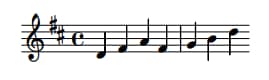
GRUB_INIT_TUNE="480 294 1 370 1 440 1 370 1 392 1 494 1 294 1"

Thatโ€™ll give you a jaunty, bouncy opener โ€” suitable for mild neighbour complaints. ๐Ÿ’ƒ๐ŸŽป

Chords? GRUB canโ€™t play them simultaneously โ€” but you can fake them by rapid time-multiplexing (cycling the chord notes quickly).
It sounds like a buzzing organ, not a symphony, but itโ€™s delightful in small doses.

Fun fact ๐Ÿ’พ: this time-multiplexing trick isnโ€™t new โ€” itโ€™s straight out of the 8-bit video game era.
Old sound chips (like those in the Commodore 64 and NES) used the same sleight of hand to make
a single channel pretend to play multiple notes at once.
If youโ€™ve ever heard a chiptune shimmer with impossible harmonies, thatโ€™s the same magic. โœจ๐ŸŽฎ


๐Ÿงฐ Tools I Like (and That You Secretly Want)

If youโ€™re not into manually counting numbers, do this:

Use a small composer script (I wrote one) that:

  • Accepts melodic notation like D4 F#4 A4 or C4+E4+G4 (chord syntax).
  • Can preview via your system audio (so you donโ€™t have to reboot to hear it).
  • Can install the result into /etc/default/grub and run update-grub (only as sudo).

Preview before you install. Always.
Your ears will tell you if your โ€œode to systemdโ€ is charming or actually offensive.

For chords, the script time-multiplexes: e.g. for a 500 ms chord and 15 ms slices,
it cycles the chord notes quickly so the ear blends them.
Itโ€™s not true polyphony, but itโ€™s a fun trick.

(If you want the full script I iterated on: drop me a comment. But it’s more fun to leave as an exercise to the reader.)


๐Ÿงฎ Limits, Memory, and โ€œHow Big Before It Breaks?โ€

Yes, my Red Team colleague will love this paragraph โ€” and no, Iโ€™m not going to hand over a checklist for breaking things.

Short answer: GRUB doesnโ€™t advertise a single fixed limit for GRUB_INIT_TUNE length.

Longer answer, responsibly phrased:

  • Numeric limits: per note pitch/duration โ‰ค 65535 (uint16_t).
  • Tempo: can go up to uint32_t.
  • Parser & memory: the tune is tokenized at boot, so parsing buffers and allocators impose practical limits.
    Expect a few kilobytes to be safe; hundreds of kilobytes is where things get flaky.
  • Usability: if your tune is measured in minutes, youโ€™ve already lost. Donโ€™t be that.

If you want to test where the parser chokes, do it in a disposable VM, never on production hardware.
If youโ€™re feeling brave, you can even audit the GRUB source for buffer sizes in your specific version. ๐Ÿงฉ


โš™๏ธ How to Make It Sing

Edit /etc/default/grub and add a line like this:

GRUB_INIT_TUNE="480 440 1 494 1 523 1  587 1  659 3"

Then rebuild your config:

sudo update-grub

Reboot, and bask in the glory of your new startup sound.
Your BIOS will literally play you in. ๐ŸŽถ


๐Ÿ’ก Final Thoughts

GRUB_INIT_TUNE is the operating-system equivalent of a ringtone for your toaster:
ridiculously low fidelity, disproportionately satisfying,
and a perfect tiny place to inject personality into an otherwise beige boot.

Use it for a smile, not for sabotage.

And just when I thought Iโ€™d been all clever reverse-engineering GRUB beeps myselfโ€ฆ
I discovered that someone already built a web-based GRUB tune tester!
๐Ÿ‘‰ https://breadmaker.github.io/grub-tune-tester/

Yes, you can compose and preview tunes right in your browser โ€”
no need to sacrifice your system to the gods of early boot audio.
Itโ€™s surprisingly slick.

Even better, thereโ€™s a small but lively community posting their GRUB masterpieces on Reddit and other forums.
From Mario theme beeps to Doom startup riffs, thereโ€™s something both geeky and glorious about it.
Youโ€™ll find everything from tasteful minimalist dings to full-on โ€œsomeone please stop themโ€ anthems. ๐ŸŽฎ๐ŸŽถ

Boot loud, boot proud โ€” but please boot considerate. ๐Ÿ˜„๐ŸŽป๐Ÿ’ป

Resurrecting My Windows Partition After 4 Years ๐Ÿ–ฅ๏ธ๐ŸŽฎ

Sometimes Linux life is bliss. I have my terminal, my editor, my tools, and Steam games that run natively. For nearly four years, I didnโ€™t touch Windows once โ€” and I didnโ€™t miss it.

And then Fortnite happened.

My girlfriend Enya and her wife Kyra got hooked, and naturally I wanted to join them. But Fortnite refuses to run on Linux โ€” apparently some copy-protection magic that digs into the Windows kernel, according to Reddit (so I don’t know if it’s true). Itโ€™s rare these days for a game to be Windows-only, but rare enough to shatter my Linux-only bubble. Suddenly, resurrecting Windows wasnโ€™t a chore anymore; it was a quest for polyamorous Battle Royale glory. ๐Ÿ•น๏ธ

My Windows 11 partition had been hibernating since November 2021, quietly gathering dust and updates in a forgotten corner of the disk. Why it stopped working back then? I honestly donโ€™t remember, but apparently I had blogged about it. I hadnโ€™t cared โ€” until now.


The Awakening โ€“ Peeking Into the UEFI Abyss ๐Ÿง

I started my journey with my usual tools: efibootmgr and update-grub on Ubuntu. I wanted to see what the firmware thought was bootable:

sudo efibootmgr

Output:

BootCurrent: 0001
Timeout: 1 seconds
BootOrder: 0001,0000
Boot0000* Windows Boot Manager ...
Boot0001* Ubuntu ...

At first glance, everything seemed fine. Ubuntu booted as usual. Windowsโ€ฆ did not. It didn’t even show up in the GRUB boot menu. A little disappointingโ€”but not unexpected, given that it hadnโ€™t been touched in years. ๐Ÿ˜ฌ

I knew the firmware knew about Windowsโ€”but the OS itself refused to wake up.


The Hidden Enemy โ€“ Why os-prober Was Disabled โš™๏ธ

I soon learned that recent Ubuntu versions disable os-prober by default. This is partly to speed up boot and partly to avoid probing unknown partitions automatically, which could theoretically be a security risk.

I re-enabled it in /etc/default/grub:

GRUB_DISABLE_OS_PROBER=false

Then ran:

sudo update-grub

Even after this tweak, Windows still didnโ€™t appear in the GRUB menu.


The Manual Attempt โ€“ GRUB to the Rescue โœ๏ธ

Determined, I added a manual GRUB entry in /etc/grub.d/40_custom:

menuentry "Windows" {
    insmod part_gpt
    insmod fat
    insmod chain
    search --no-floppy --fs-uuid --set=root 99C1-B96E
    chainloader /EFI/Microsoft/Boot/bootmgfw.efi
}

How I found the EFI partition UUID:

sudo blkid | grep EFI

Result: UUID="99C1-B96E"

Ran sudo update-grubโ€ฆ Windows showed up in GRUB! But clicking it? Nothing.

At this stage, Windows still wouldnโ€™t boot. The ghost remained untouchable.


The Missing File โ€“ Hunt for bootmgfw.efi ๐Ÿ—‚๏ธ

The culprit? bootmgfw.efi itself was gone. My chainloader had nothing to point to.

I mounted the NTFS Windows partition (at /home/amedee/windows) and searched for the missing EFI file:

sudo find /home/amedee/windows/ -type f -name "bootmgfw.efi"
/home/amedee/windows/Windows/Boot/EFI/bootmgfw.efi

The EFI file was hidden away, but thankfully intact. I copied it into the proper EFI directory:

sudo cp /home/amedee/windows/Windows/Boot/EFI/bootmgfw.efi /boot/efi/EFI/Microsoft/Boot/

After a final sudo update-grub, Windows appeared automatically in the GRUB menu. Finally, clicking the entry actually booted Windows. Victory! ๐Ÿฅณ


Four Years of Sleeping Giants ๐Ÿ•ฐ๏ธ

Booting Windows after four years was like opening a time capsule. I was greeted with thousands of updates, drivers, software installations, and of course, the installation of Fortnite itself. It took hours, but it was worth it. The old system came back to life.

Every โ€œupdate completeโ€ message was a heartbeat closer to joining Enya and Kyra in the Battle Royale.


The GRUB Disappearance โ€“ Enter Ventoy ๐Ÿ”ง

After celebrating Windows resurrection, I rebootedโ€ฆ and panic struck.

The GRUB menu had vanished. My system booted straight into Windows, leaving me without access to Linux. How could I escape?

I grabbed my trusty Ventoy USB stick (the same one I had used for performance tests months ago) and booted it in UEFI mode. Once in the live environment, I inspected the boot entries:

sudo efibootmgr -v

Output:

BootCurrent: 0002
Timeout: 1 seconds
BootOrder: 0002,0000,0001
Boot0000* Windows Boot Manager ...
Boot0001* Ubuntu ...
Boot0002* USB Ventoy ...

To restore Ubuntu to the top of the boot order:

sudo efibootmgr -o 0001,0000

Console output:

BootOrder changed from 0002,0000,0001 to 0001,0000

After rebooting, the GRUB menu reappeared, listing both Ubuntu and Windows. I could finally choose my OS again without further fiddling. ๐Ÿ’ช


A Word on Secure Boot and Signed Kernels ๐Ÿ”

Since weโ€™re talking bootloaders: Secure Boot only allows EFI binaries signed with a trusted key to execute. Ubuntu Desktop ships with signed kernels and a signed shim so it boots fine out of the box. If you build your own kernel or use unsigned modules, youโ€™ll either need to sign them yourself or disable Secure Boot in firmware.


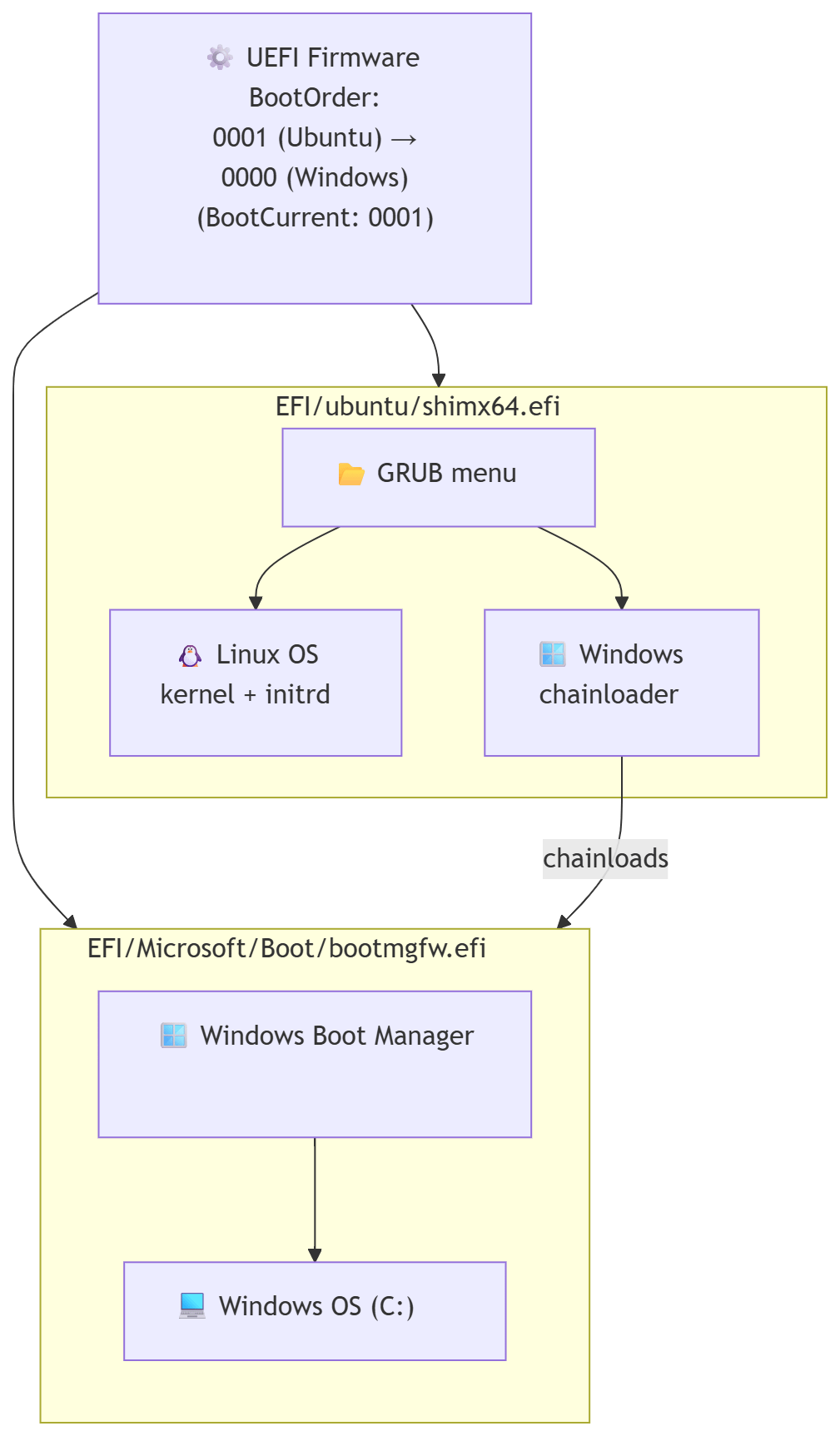
Diagram of the Boot Flow ๐Ÿ–ผ๏ธ

Hereโ€™s a visual representation of the boot process after the fix:

flowchart TD
    UEFI["โš™๏ธ UEFI Firmware BootOrder:<br/>0001 (Ubuntu) โ†’<br/>0000 (Windows)<br/>(BootCurrent: 0001)"]

    subgraph UbuntuEFI["shimx64.efi"]
        GRUB["๐Ÿ“‚ GRUB menu"]
        LINUX["๐Ÿง Ubuntu Linux<br/>kernel + initrd"]
        CHAINLOAD["๐ŸชŸ Windows<br/>bootmgfw.efi"]
    end

    subgraph WindowsEFI["bootmgfw.efi"]
        WBM["๐ŸชŸย Windowsย Bootย Manager"]
        WINOS["๐Ÿ’ป Windows 11<br/>(C:)"]
    end

    UEFI --> UbuntuEFI
    GRUB -->|boots| LINUX
    GRUB -.->|chainloads| CHAINLOAD
    UEFI --> WindowsEFI
    WBM -->|boots| WINOS

From the GRUB menu, the Windows entry chainloads bootmgfw.efi, which then points to the Windows Boot Manager, finally booting Windows itself.


First Battle Royale ๐ŸŽฎโœจ

After all the technical drama and late-night troubleshooting, I finally joined Enya and Kyra in Fortnite.

I had never played Fortnite before, but my FPS experience (Borderlands hype, anyone?) and PUBG knowledge from Viva La Dirt League on YouTube gave me a fighting chance.

We won our first Battle Royale together! ๐Ÿ†๐Ÿ’ฅ The sense of triumph was surrealโ€”after resurrecting a four-year-old Windows partition, surviving driver hell, and finally joining the game, victory felt glorious.


TL;DR: Quick Repair Steps โšก

  1. Enable os-prober in /etc/default/grub.
  2. If Windows isnโ€™t detected, try a manual GRUB entry.
  3. If boot fails, copy bootmgfw.efi from the NTFS Windows partition to /boot/efi/EFI/Microsoft/Boot/.
  4. Run sudo update-grub.
  5. If GRUB disappears after booting Windows, boot a Live USB (UEFI mode) and adjust efibootmgr to set Ubuntu first.
  6. Reboot and enjoy both OSes. ๐ŸŽ‰

This little adventure taught me more about GRUB, UEFI, and EFI files than I ever wanted to know, but it was worth it. Most importantly, I got to join my polycule in a Fortnite victory and prove that even a four-year-old Windows partition can rise again! ๐Ÿ’–๐ŸŽฎ