Do I Really Need AI for Automatic Dependency Updates?
Dependency updates are one of those areas where AI is often presented as an obvious win. But when you look closely, the value proposition can be surprisingly thin.
Every few months I find myself looking at a piece of automation I wrote and asking a dangerous question:
“If I deleted this today, would I miss it?”
Recently that question came up while looking at some code that uses AI to assist with commit messages for automatic dependency updates.
It’s undeniably cool. And if we’re being honest, “cool” has probably justified more engineering decisions than we’d like to admit. ✨ Somewhere, a developer is about to spend three days adding AI to a workflow that already takes five seconds, and nobody is stopping them.
When a bot updates a dependency, AI can inspect the diff, generate a polished commit message, summarize release notes, estimate risk, and even draft a pull request description. Give it another six months and it’ll probably offer unsolicited opinions about my coding style, too. Beep-boop-beep-beep. 🤖
But do I actually need any of that?
For dependency updates specifically, I’m not convinced.
The Diff Already Explains Everything
Most dependency update pull requests are boring.
That’s not a criticism. Boring is good. In fact, “boring” is one of my favorite qualities in infrastructure. Right up there with “predictable”, “consistent”, and “unlikely to trigger a sensory response.” 😌
A typical update looks like this:
- Newtonsoft.Json 13.0.2
+ Newtonsoft.Json 13.0.3
Or:
- actions/checkout@v3
+ actions/checkout@v4
The dependency changed. The version changed. The automated tests passed.
What more needs to be said?
An AI-generated commit message such as:
Update Newtonsoft.Json from 13.0.2 to 13.0.3 to incorporate the latest improvements and fixes.
is objectively more polished than:
chore: update thing
and considerably less polished than the commit messages written by developers who own more than one ergonomic keyboard. ⌨️
But it doesn’t add information.
It’s merely a longer version of the diff.
The Cost of Automating the Obvious
AI systems are not free.
Even when the direct cost is negligible, there is still operational complexity:
- Prompt engineering
- API keys
- Rate limiting
- Error handling
- Monitoring
- Dependency on external services
- Additional maintenance burden
For a feature whose main purpose is generating text that developers may never read, that’s a surprisingly long list.
The irony is hard to ignore.
I’m adding dependencies to manage dependency updates.
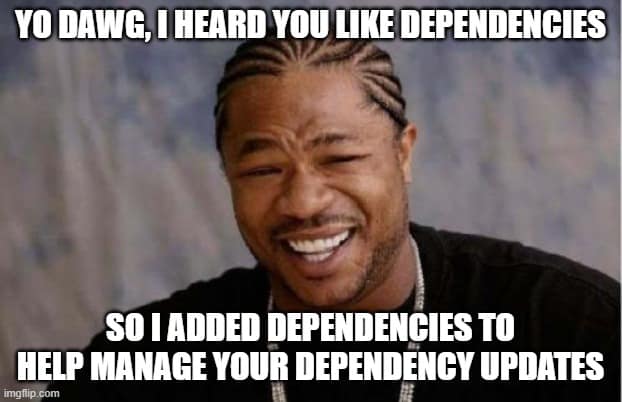
Or at least a moment of honest self-reflection and perhaps a nice cup of tea. ☕
Most Dependency Updates Require Validation, Not Summarization
The real value in dependency management isn’t explaining what changed.
It’s determining whether the change is safe.
Questions such as:
- Did tests pass?
- Are there breaking changes?
- Did security vulnerabilities disappear?
- Has runtime behavior changed?
- Should this be rolled out gradually?
Those are useful questions.
An automatically generated paragraph of prose is not.
If I had to choose between:
- AI-generated release summaries
- Better test coverage
I’d take better tests every time.
Where AI Actually Helps
To be clear, I’m not arguing that AI is useless in dependency management.
There are situations where it genuinely provides value.
For example:
Large Version Jumps
Updating from:
React 17 -> React 19
is not the same as:
React 19.1.0 -> 19.1.1
That’s the difference between “let’s merge this before lunch” and “let’s spend the next three hours reading documentation for fun.” 😅
The first update may involve deprecations, migration guides, and behavioral changes spread across hundreds of pages of documentation.
Having AI summarize those changes can save time.
Dependency Investigation
When a vulnerability appears in a transitive dependency, AI can help answer questions like:
- Why do I have this package?
- Which component pulls it in?
- What are my upgrade options?
That’s actual analysis.
Pull Request Triage
In environments processing hundreds of updates per week, AI can prioritize and categorize changes:
- Security-related
- Major version updates
- Low-risk patch releases
- Updates requiring manual review
Again, this is valuable because it’s helping people make decisions.
The “Because We Can” Trap
One of the easiest mistakes in engineering is automating something because it is technically possible. AI makes this temptation even stronger.
You add a model call.
The output looks impressive.
Everyone nods.
Nobody wants to ask whether the feature is genuinely useful. Which is ironic, because asking uncomfortable questions is usually how I ended up adding the feature in the first place. 😅
Six months later nobody reads the generated text, nobody remembers why it exists, and the system is carrying around a feature whose primary function is making demos more interesting.
That’s usually the moment when the dangerous question returns:
“What would happen if I deleted this?”
If the answer is “nothing,” deletion should be a serious option.
Simplicity Is a Feature
The software industry currently has a tendency to ask:
“How can we add AI to this?”
A more useful question is:
“What problem exists that AI uniquely solves?”
For routine dependency updates, I’m not sure there is much of a problem to solve.
- A dependency bot opens a pull request.
- The diff shows the change.
- CI validates the result.
- Humans review anything important.
That’s already a remarkably effective system.
The AI-generated commit message may be neat. It may even spark a ten-minute discussion about style, consistency, and aesthetics that is somehow completely unrelated to dependency management. But aesthetically pleasing is not the same thing as necessity.
And sometimes the best engineering decision is not building something new.
Sometimes it’s deleting code and discovering that nothing got worse.
Maybe Open Source Instead of Delete?
Just because I’m questioning a feature’s place in my workflow doesn’t mean the code itself has no value.
What started as an experiment in AI-generated commit messages evolved into a working GitHub Action. It takes a diff, calls an LLM, and produces a commit message that is often more polished than what most developers would write themselves.
The question isn’t whether it works. The question is whether it solves a problem I still have. For routine dependency updates, I increasingly think the answer is “not really.”
For routine dependency updates, the diff already tells the story. The generated explanation rarely influences whether I merge a change. Most of my confidence still comes from test results, release notes, and experience with the dependency itself.
But that doesn’t mean the idea is universally useless.
Some teams maintain hundreds of repositories. Some want consistent commit messages. Some value automated summaries and release notes. Others simply enjoy experimenting with AI-assisted workflows.
So rather than keeping an optional AI component embedded in a critical workflow, I have extracted it into its own repository and made it public on GitHub:
That has a few benefits:
- My dependency update process stays simple.
- The action remains available for anyone who finds it useful.
- Future development can happen independently.
- The project can stand on its own merits. Or fail gloriously on its own merits. Open source is wonderfully impartial that way. Besides, releasing a side project to the public is significantly cheaper than buying another keyboard, graphics card, or suspiciously expensive cardigan. 😅
In a way, open-sourcing it feels like a more honest outcome than quietly keeping it around forever. If the idea is genuinely useful, people will adopt it. If not, that’s valuable feedback too. I’ve spent enough time collecting niche interests to know that “a surprisingly specific audience of twelve people” can still be a community. 🌈
Sometimes publishing a project is the fastest way to discover whether you’ve built a product, a feature, or simply an interesting experiment.
Not because I’m convinced AI-generated commit messages are essential, but because software doesn’t have to be essential to be useful. Sometimes an experiment is worth sharing even after you’ve decided not to keep it in production.
Worst case, it becomes a small open-source artifact of a particular moment in the industry’s AI enthusiasm.
Best case, somebody finds a use for it that I never did.
A Note on How This Post Was Written
Some honest truth: was this blog post (co-)written by AI?
Yes.
I gave Copilot (don’t shoot me! I also use other Large Language Models) an abstract, a rough outline of the argument I wanted to make, and the source code of the GitHub Action discussed in this article. It generated an initial draft. Which, to be fair, is also how I approach many hobbies: start with an overwhelming amount of information and then spend hours reorganizing it until it feels right. 😅
After that, though, the process looked a lot like editing any other piece of writing. I rewrote sections, changed wording, moved paragraphs around, added examples, removed points that didn’t fit, and generally shaped the article into something that reflects my own opinion. In other words, the AI produced a draft and I spent the rest of the time refining presentation details until they felt correct. If that process sounds familiar, no further questions. ✨
I can’t escape the irony of using AI to help write a blog post that questions whether AI is needed for a particular problem.
That irony is intentional.
In fact, it reinforces the point I’m trying to make.
The problem was never “AI bad” versus “AI good”. The question is whether AI adds enough value to justify its complexity. For writing, brainstorming, editing, and turning rough ideas into a first draft, I often find that it does. For generating commit messages for routine dependency updates, I’m much less convinced.
AI helped me write this post faster.
I’m not sure it helped me review dependency updates any better.
And that distinction is precisely why this blog post exists.