Skip to content

Uncategorized

Onzin, onzin, allemaal onzin!

Moving!

A few months ago I wrote about my preferred region to work. Well, that’s no longer true. The co-housing project where I live (in Merelbeke, near Ghent) is going to end, and I need to move by the end of July 2022.

This also has an influence on my preferred place to work. I have decided to find a place to live not too far from work, wherever that may be (because I’m still on the #jobhunt). Ideally it would be inside the triangle Ghent-Antwerp-Brussels but I think I could even be convinced by the Leuven area.

Factors I’ll take into account:

  • Elevation and hydrology – with climate change, I don’t want to live somewhere with increased risk of flooding.
  • Proximity of essential shops and services.
  • Proximity of public transport with a good service.
  • Proximity of car sharing services like Cambio.
  • Not too far from something green (a park will do just fine) to go for a walk or a run.

I haven’t started looking yet, I’m not even sure if I want to do co-housing again, or live on my own. That’ll depend on the price, I guess. (Living alone? In this economy???) First I want to land on a job.

That makes senseโ€”without knowing where I will be working, house hunting feels a bit like putting the cart before the horse. Still, I find myself browsing listings occasionally, more out of curiosity than anything else. It is interesting to see how prices and availability vary wildly, even within the triangle I mentioned. Some towns look charming on paper but lack the basics I need; others tick all the boxes but come with a rental price that makes my eyebrows do gymnastics.

In the meantime, I am mentally preparing for a lot of change. Leaving my current co-housing situation is bittersweet. On one hand, it has been a wonderful experience: shared dinners, spontaneous conversations, and a real sense of community. On the other hand, living with others also means compromise, and part of me wonders what it would be like to have a space entirely to myself. No shared fridges, no waiting for the bathroom, and the joy of decorating a place to my own taste.

That said, co-housing still appeals to me. If I stumble upon a like-minded group or an interesting project in a new city, I would definitely consider it. The key will be finding something that balances affordability, autonomy, and connection. I do not need a commune, but I also do not want to feel isolated.

I suppose this transition is about more than just logisticsโ€”it is also a moment to rethink what I want day-to-day life to look like. Am I willing to commute a bit longer for a greener environment? Would I trade square meters for access to culture and nightlife? Do I want to wake up to birdsong or the rumble of trams?

These are the questions swirling around my head as I polish up my CV, send out job applications, and daydream about future homes. It is a lot to juggle, but oddly enough, I feel optimistic. This is a chance to design a new chapter from scratch. A little daunting, sure. But also full of possibility.

How I organize my message flow

Email

I use 2 email clients at the same time: Thunderbird and Gmail.

  • Thunderbird: runs on my local system, it’s very fast, it shows me all the metadata of an email in the way I want, the email list is not paged, I can use it for high volume actions on email. These happen on my local system, and then the IMAP protocol gradually syncs it to Gmail. I also find that Thunderbird’s email notifications integrate nicer in Ubuntu.
  • Gmail: can’t be beaten for search. It also groups mail conversations. And then there are labels!
How to turn on Conversation View in Gmail

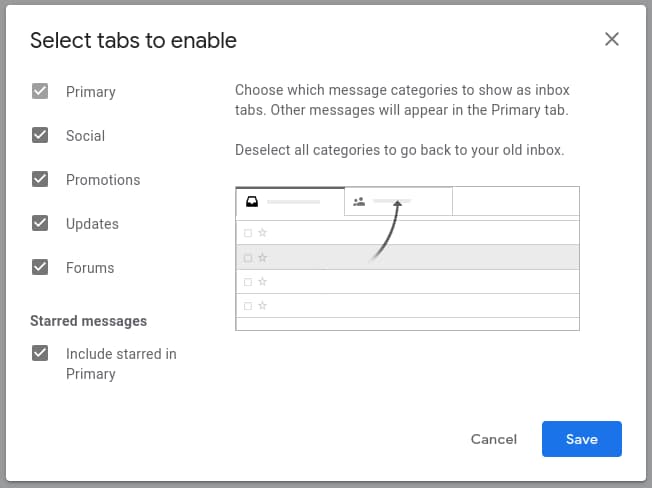
Gmail has several tabs: Primary, Social, Promotions, Updates and Forums. Gmail is usually smart enough that it can classify most emails in the correct tab. If it doesn’t: drag the email to the correct tab, and Gmail will ask you if all future emails of that sender should go to the same tab. This system works well enough for me. My email routine is to first check the tabs Social, Promotions and Forums, and delete or unsubscribe from most emails that end up there. All emails about the go to Updates. I clean up the other emails in that tab (delete, unsubscribe, filter, archive) so that only the emails remain. Those I give a label – more about that later. Then I go to the Inbox. Any emails there (shouldn’t be many) are also taken care of: delete, unsubscribe, filter, archive or reply.

Enable Gmail tabs
Gmail tabs

Google has 3 Send options: regular Send, Schedule send (which I don’t use) and Send + Archive. The last one is probably my favorite button. When I reply to an email, it is in most cases a final action on that item, so after the email is sent, it’s dealt with, and I don’t need to see it in my Inbox any more. And if there is a reply on the email, then the entire conversation will just go to the Inbox again (unarchived).

Send + Archive

I love labels! At the level of an individual email, you can add several labels. The tabs are also labels, so if you add the label Inbox to an archived email, then it will be shown in the Inbox again. At the level of the entire mailbox, labels behave a bit like mail folders. You can even have labels within labels, in a directory structure. Contrary to traditional mail clients, where an email could only be in one mail folder, you can add as many labels as you want.
The labels are also shown as folders in an IMAP mail client like Thunderbird. If you move an email from one folder to another, then the corresponding label gets updated in Gmail.
The filters that I use in my are work/jobhunt, work/jobhunt/call_back, work/jobhunt/not_interesting, work/jobhunt/not_interesting/freelance, work/jobhunt/not_interesting/abroad, work/jobsites and work/coaching. The emails that end up with the abroad label, are source material for my blog post Working Abroad?

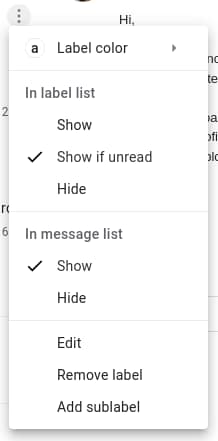
The label list on the left looks like a directory structure. It’s actually a mix of labels and traditional folders like Sent, Drafts, Spam, Trash,… Those are always visible at the top. Then there is a neat little trick for labels. If you have a lot of labels, like me, then Gmail will hide some of them behind a “More” button. You can influence which labels are always visible by selecting Show if unread on that label. This only applies to top-level labels. When there are no unread emails with that label or any of it’s sublabels, then the label will be hidden below the More button. As soon as there are unread mails with that label or any of it’s sublabels, then the label will be visible. Mark all mails as read, and the label is out of view. Again, less clutter, you only see it when you need it.

Show if unread

Filters, filters, filters. I think I have a gazillion filters. (208, actually – I exported them to XML so I could count them) Each time I have more than two emails that have something meaningful in common, I make a filter. Most of my filters have the setting ‘Skip Inbox’. They will remain unread in the label where I put them, and I’ll read them when it’s convenient for me. For example, emails that are automatically labelled takeaway aren’t important and don’t need to be in the Inbox, but when I want to order takeaway, I take a look in that folder to see if there are any promo codes.

Email templates. Write a draft email, click on the 3 dots bottom right, save draft as template. Now I can reuse the same text so that I don’t have to write for the umpteenth time that I don’t do freelance. I could send an autoreply with templates, but for now I’ll still do it manually.

LinkedIn

I can be short about that: it’s a mess. You can only access LinkedIn messages from the website, and if you have a lot of messages, then it behaves like a garbage pile. Some people also have an expectation that it’s some sort of instant messaging. For me it definitely isn’t. And just like with email: I archive LinkedIn chats as soon as I have replied.

I used to have an autoreply that told people to email me, and gave a link to my CV and my blog. What do you think, should I enable that again?

Reduce unit tests boilerplate with Jestโ€™s .each syntax

When writing unit tests, especially in JavaScript/TypeScript with Jest, you often run into a common problem: repetition.
Imagine testing a function with several input-output pairs. The tests can become bloated and harder to read.
This is where Jestโ€™s .each syntax shines. It lets you write cleaner, data-driven tests with minimal duplication.

The Problem: Repetitive Test Cases

Take a simple sum function:

function sum(a, b) {
  return a + b;
}

Without .each, you might write your tests like this:

test('adds 1 + 2 to equal 3', () => {
  expect(sum(1, 2)).toBe(3);
});

test('adds 2 + 3 to equal 5', () => {
  expect(sum(2, 3)).toBe(5);
});

test('adds -1 + -1 to equal -2', () => {
  expect(sum(-1, -1)).toBe(-2);
});

These tests work, but they are verbose. You repeat the same logic over and over with only the inputs and expected results changing.

The Solution: Jestโ€™s .each Syntax

Jestโ€™s .each allows you to define test cases as data and reuse the same test body.
Here is the same example using .each:

describe('sum', () => {
  test.each([
    [1, 2, 3],
    [2, 3, 5],
    [-1, -1, -2],
  ])('returns %i when %i + %i', (a, b, expected) => {
    expect(sum(a, b)).toBe(expected);
  });
});

This single block of code replaces three separate test cases.
Each array in the .each list corresponds to a test run, and Jest automatically substitutes the values.

Bonus: Named Arguments with Tagged Template Literals

You can also use named arguments for clarity:

test.each`
  a    | b    | expected
  ${1} | ${2} | ${3}
  ${2} | ${3} | ${5}
  ${-1}| ${-1}| ${-2}
`('returns $expected when $a + $b', ({ a, b, expected }) => {
  expect(sum(a, b)).toBe(expected);
});

This syntax is more readable, especially when dealing with longer or more descriptive variable names.
It reads like a mini table of test cases.

Why Use .each?

  • Less boilerplate: Define the test once and reuse it.
  • Better readability: Data-driven tests are easier to scan.
  • Easier maintenance: Add or remove cases without duplicating test logic.
  • Fewer mistakes: Repeating the same code invites copy-paste errors.

Use Case: Validating Multiple Inputs

Suppose you are testing a validation function like isEmail. You can define all test cases in one place:

test.each([
  ['user@example.com', true],
  ['not-an-email', false],
  ['hello@world.io', true],
  ['@missing.local', false],
])('validates %s as %s', (input, expected) => {
  expect(isEmail(input)).toBe(expected);
});

This approach scales better than writing individual test blocks for every email address.

Conclusion

Jestโ€™s .each is a powerful way to reduce duplication in your test suite.
It helps you write cleaner, more maintainable, and more expressive tests.
Next time you find yourself writing nearly identical test cases, reach for .eachโ€”your future self will thank you.

My take on the Gilded Rose kata

The Gilded Rose Kata by Emily Bache is a staple in refactoring exercises. It offers a deceptively simple problem: refactor an existing codebase while preserving its behavior. I recently worked through the TypeScript version of the kata, and this post documents the transformation from a legacy mess into clean, testable codeโ€”with examples along the way.

But before diving into the code, I should mention: this was my very first encounter with TypeScript. I had never written a single line in the language before this exercise. That added an extra layer of learningโ€”on top of refactoring legacy code, I was also picking up TypeScriptโ€™s type system, syntax, and tooling from scratch.


๐Ÿงช Development Workflow

Pre-Commit Hooks

pre-commit.com is a framework for managing and maintaining multi-language pre-commit hooks. It allows you to define a set of checks (such as code formatting, linting, or security scans) that automatically run before every commit, helping ensure code quality and consistency across a team. Hooks are easily configured in a .pre-commit-config.yaml file and can be reused from popular repositories or custom scripts. It integrates seamlessly with Git and supports many languages and tools out of the box.

I added eslint and gitlint:

- repo: https://github.com/pre-commit/mirrors-eslint
  hooks:
    - id: eslint

  - repo: https://github.com/jorisroovers/gitlint
    hooks:
      - id: gitlint

GitHub Actions

GitHub Actions was used to automate the testing workflow, ensuring that every push runs the full test suite. This provides immediate feedback when changes break functionality, which was especially important while refactoring the legacy Gilded Rose code. The setup installs dependencies with npm, runs tests with yarn, and ensures consistent results across different environmentsโ€”helping maintain code quality and giving confidence to refactor freely while learning TypeScript.

name: Build

on:
  push:
    branches: [ main ]
  pull_request:
    branches: [ main ]

jobs:
  build:
    runs-on: ubuntu-latest

    strategy:
      matrix:
        node-version: [12.x]

    steps:
      - uses: actions/checkout@v2
      - name: Node.js
        uses: actions/setup-node@v1
        with:
          node-version: ${{ matrix.node-version }}
      - run: npm install -g yarn
        working-directory: ./TypeScript
      - name: yarn install, compile and test
        run: |
          yarn
          yarn compile
          yarn test
        working-directory: ./TypeScript

๐Ÿ” Starting Point: Legacy Logic

Originally, everything was handled in a massive updateQuality() function using nested if statements like this:

if (item.name !== 'Aged Brie' && item.name !== 'Backstage passes') {
    if (item.quality > 0) {
        item.quality--;
    }
} else {
    if (item.quality < 50) {
        item.quality++;
    }
}

The function mixed different concerns and was painful to extend.


๐Ÿงช Building Safety Nets

Golden master tests are a technique used to protect legacy code during refactoring by capturing the current behavior of the system and comparing it against future runs. In this project, I recorded the output of the original updateQuality() function across many item variations. As changes were made to clean up and restructure the logic, the tests ensured that the external behavior remained identical. This approach was especially useful when the codebase was poorly understood or untested, offering a reliable safety net while improving internal structure.

expect(goldenMasterOutput).toEqual(currentOutput);

๐Ÿงน Refactoring: Toward Structure and Simplicity

1. Extracting Logic

I moved logic to a separate method:

private doUpdateQuality(item: Item) {
    // clean, focused logic
}

This isolated the business rules from boilerplate iteration.

2. Replacing Conditionals with a switch

Using a switch statement instead of multiple if/else if blocks makes the code cleaner, more readable, and easier to maintainโ€”especially when checking a single variable (like item.name) against several known values. It clearly separates each case, making it easier to scan and reason about the logic. In the Gilded Rose project, switching to switch also made it easier to later refactor into specialized handlers or classes for each item type, as each case represented a clear and distinct behavior to isolate.

switch (item.name) {
    case 'Aged Brie':
        this.updateBrie(item);
        break;
    case 'Sulfuras':
        break; // no-op
    case 'Backstage passes':
        this.updateBackstage(item);
        break;
    default:
        this.updateNormal(item);
}

This increased clarity and prepared the ground for polymorphism or factory patterns later.


๐Ÿ›  Polishing the Code

Constants and Math Utilities

Instead of magic strings and numbers, I introduced constants:

const MAX_QUALITY = 50;
const MIN_QUALITY = 0;

I replaced verbose checks with:

item.quality = Math.min(MAX_QUALITY, item.quality + 1);

Factory Pattern

The factory pattern is a design pattern that creates objects without exposing the exact class or construction logic to the code that uses them. Instead of instantiating classes directly with new, a factory function or class decides which subclass to return based on inputโ€”like item names in the Gilded Rose kata. This makes it easy to add new behaviors (e.g., โ€œConjuredโ€ items) without changing existing logic, supporting the Open/Closed Principle and keeping the code modular and easier to test or extend.

switch (true) {
    case /^Conjured/.test(item.name):
        return new ConjuredItem(item);
    case item.name === 'Sulfuras':
        return new SulfurasItem(item);
    // ...
}

๐ŸŒŸ Feature Additions

With structure in place, adding Conjured Items was straightforward:

class ConjuredItem extends ItemUpdater {
    update() {
        this.decreaseQuality(2);
        this.decreaseSellIn();
    }
}

A corresponding test was added to confirm behavior.


๐ŸŽฏ Conclusion

The journey from legacy to clean architecture was iterative and rewarding. Key takeaways:

  • Set up CI and hooks early to enforce consistency.
  • Use golden master tests for safety.
  • Start small with extractions and switch statements.
  • Add structure graduallyโ€”factories, constants, classes.
  • With a clean base, adding features like โ€œConjuredโ€ is trivial.

All this while learning TypeScript for the first time!

You can explore the full codebase and history here:
๐Ÿ“ฆ Gilded Rose Refactoring Kata โ€” TypeScript branch

Curious to try it yourself, also in other languages?
Fork Emily Bache’s repo here: GildedRose-Refactoring-Kata on GitHub

Jag lรคr mig spela nyckelharpa

In 2016 I did something unexpected: I picked up a nyckelharpa for the very first time.

Jag hade aldrig spelat ett instrument “pรฅ riktigt” tidigare. Visst, jag spelade blockflรถjt i skolan โ€“ men jag var usel pรฅ det och hatade varje minut. So when I started learning nyckelharpa, it was a fresh beginning, a clean slate.

Varfรถr nyckelharpa?

One of the biggest reasons I got interested in the nyckelharpa is because I love to dance โ€“ especially balfolk, and even more so the Swedish polska. Det bรถrjade alltsรฅ med dansen. Jag lyssnade pรฅ mycket polska, och snart mรคrkte jag att mรฅnga av mina favoritlรฅtar spelades pรฅ nyckelharpa. Before I knew it, I wanted to try playing them myself.

Vad รคr en nyckelharpa?

A nyckelharpa is a traditional Swedish keyed fiddle. It has strings that you play with a bow, and instead of pressing the strings directly, you use wooden keys that stop the string at the correct pitch. Det ger en vรคldigt speciell klang โ€“ varm, vibrerande och nรคstan magisk. Jag blev fรถrรคlskad i ljudet direkt.

Mina fรถrsta steg

Jag bรถrjade ta lektioner pรฅ musikskolan i Schoten, Belgien, dรคr min lรคrare รคr Ann Heynen. Sedan dess har jag deltagit i mรฅnga helgkurser och workshops i Belgien, Tyskland, Nederlรคnderna och Storbritannien.
(Jag har inte varit i Sverige fรถr kurser โ€“ รคnnu! Men det finns pรฅ min รถnskelista.)

Det var dรคr jag fick lรคra mig av nรฅgra av de mest inspirerande spelmรคn och -kvinnor jag nรฅgonsin trรคffat:
Jule Bauer, Magnus Holmstrรถm, Emilia Amper, Marco Ambrosini, Didier Franรงois, Josefina Paulson, Vicki Swan, David Eriksson, Olena Yeremenko, Bjรถrn Kaidel, Olov Johansson, Elรฉonore Billy, Johannes Mayr, Johan Lรฅng, Alban Faust, Koen Vanmeerbeek, Eveline d’Hanens โ€“ och sรคkert mรฅnga fler fantastiska musiker jag glรถmmer just nu.

Under kurserna har jag ocksรฅ fรฅtt mรฅnga nya bekanta โ€“ och till och med riktiga vรคnner โ€“ frรฅn hela Europa.
We share the same passion for music, dancing, and culture, and it is amazing how the nyckelharpa can bring people together across borders.

Frรฅn hyra till egen nyckelharpa

Like many beginners, I started by renting an instrument. Men i 2019 kรคnde jag att det var dags att ta nรคsta steg, och jag bestรคllde min egen nyckelharpa frรฅn Jean-Claude Condi, en lutier i Mirecourt, Frankrike โ€“ ett historiskt centrum fรถr instrumentbyggare.

Tyvรคrr slog pandemin till strax efter, och det drรถjde รคnda till augusti 2021 innan jag kunde รฅka till Mirecourt och รคntligen hรคmta min nyckelharpa. It was worth the wait.

En resa i bรฅde musik och sprรฅk

Att lรคra mig spela nyckelharpa vรคckte ocksรฅ mitt intresse fรถr svensk kultur. I kept hearing Swedish in the songs, and in 2020, I finally decided to start learning the language.
Jag bรถrjade lรคsa svenska pรฅ kvรคllsskola under lรคsรฅret, och under loven fortsatte jag att รถva med Duolingo. Sedan dess har jag fรถrsรถkt kombinera mina tvรฅ passioner: sprรฅket och musiken.

Jag lyssnar ofta pรฅ svenska lรฅtar, spelar visor och folkmelodier, och ibland fรถrsรถker jag sjunga med. It is not only a way to practice, it is also incredibly rewarding.

Spela fรถr dans

One of my goals is to be able to play well enough that others can dance to my music โ€“ just like I love dancing to other people’s tunes.
Det รคr inte lรคtt, fรถr nรคr jag har lรคrt mig en lรฅt utantill, har jag redan glรถmt hur den fรถrra gickโ€ฆ Men jag fortsรคtter รถva. En dag, sรฅ!

Vad hรคnder hรคrnรคst?

Mitt mรฅl รคr att en dag spela tillsammans med andra pรฅ en riktig spelmansstรคmma i Sverige โ€“ och kanske รคntligen ta en kurs pรฅ plats i Sverige ocksรฅ.
Men fram till dess fortsรคtter jag att รถva, att lรคra mig, och att njuta av varje ton.

Jag lรคr mig spela nyckelharpa. Och jag lรคr mig svenska. Tvรฅ passioner, ett hjรคrta. โค๏ธ


๐ŸŽถ Vill du ocksรฅ bรถrja?

ร„r du nyfiken pรฅ nyckelharpa? Eller kanske du dansar balfolk och vill kunna spela sjรคlv?
Do not wait as long as I did โ€” rent an instrument, find a workshop, or try your first tune today.
And if you are already playing: hรถr gรคrna av dig! Let us jam, dance, or just talk nyckelharpa.

What are my preferred roles?

Definitely a halfling barbarian. Alignment: chaotic neutral.

Oh, you didn’t mean tabletop role playing but job roles? Riiiight…

I don’t think that this blog post will ever be complete, and it will always be evolving. But at this point, some of the things that I see myself doing:


Anything related to Continuous Delivery in software. From my perspective, that may include:

  • Test Automation – I’ve done this a lot, I liked it and wouldn’t mind doing more of it.
  • DevOps – I’m still not sure if DevOps must be a separate role, or if other roles can work better if they apply DevOps principles. That being said, I have done some devops-ish things, I liked it, and I would sure like to do more of it.
  • Software Development – There, I’ve put it in writing. I haven’t done this yet in a work context, but I like doing it and learning about it. And really – isn’t test automation also writing software?

Maybe you noticed that in none of these things I mention a specific technology. There may be tech&tools that I already have experience with, and you can read about that in my CV or on LinkedIn, but that is not what this blog post is about. I believe that technologies can (and should) always be learned, and it’s more of an attitude to work quality-driven.


Technical Storytelling or Technical Community Management
Storytelling can help simplify the complexities of new technologies. It’s a combination of technical skills, communication skills and empathy. It’s about supporting a community by creating helpful content, from sample code to tutorials, blog posts(*) and videos; speaking at conferences; and helping improve a product or technology by collecting feedback from the community. I recently read a blog post on this, and I can totally recognize myself there.

(*) Yes, the blog posts that I’m writing now, are also written with that kind of role in mind.


Also have a look at the roles that I am not interested in (but do get a lot of emails about).

What is my preferred region?

When recruiters contact me, I invariably get asked in what region I am willing to work. Well. It depends.
(scroll down for a map if you don’t want to read).

The thing is, I actually enjoy going from point A to point B. At the same time, if it is in much less than ideal situations (lots of traffic, or crowded public transportation), then I may get overstimulated, which leads to fatigue and lack of concentration. The least enjoyable commute was only 20km, by car, but it typically took me more than one hour. This was when a new bridge was constructed over the Scheldt in Temse.

The most pleasant work experiences I had, involved these commute patterns:

  • A 3km bicycle ride (about 10 minutes).
  • 30 km by car, with the first 15 minutes on almost empty rural roads, and then 25 minutes on a highway in the direction that had the least amount of traffic.
  • 5km, which I did on foot in 50 minutes (I was training for the Dodentocht at the time).
  • 40km, which I did with 5 minutes bicycle, 35 minutes train, 5 minutes walking. Ideal for listening to one or two episodes of a podcast. Doing the same distance by car would taken me about the same amount of time, in ideal conditions. And I can’t focus on traffic and listen to a podcast at the same time.
  • 6km, which was 20 minutes on a bicycle or 12 minutes by car. I preferred cycling, because I had separate bike lanes for about 80% of the way. 20 minutes was also an ideal amount of time to listen to one epidode of a podcast.

That looks like a lot of cycling, even though I don’t really consider myself to be an athletic type. It’s also eco-friendly, even though I don’t really consider myself to be an eco-warrior.

I’m not a petrol head, I don’t know anything about cars. 4 wheels and steering wheel, that’s about the limit of my knowledge. Currently I don’t even have a car, I make use of car sharing services like Cambio on the rare occasions that I actually need a car. At the same time, I do enjoy the experience of driving, especially long, smooth stretches. For example each year I go to a music course somewhere in the middle of Germany. That’s a 5 hour drive, not including stops. I absolutely love the change of scenery along the way. But but me in city traffic for an hour and I get too much input.

I have found a website where you can draw a map of the places you can reach within a certain time: TravelTime (the also have an API! โค๏ธ).

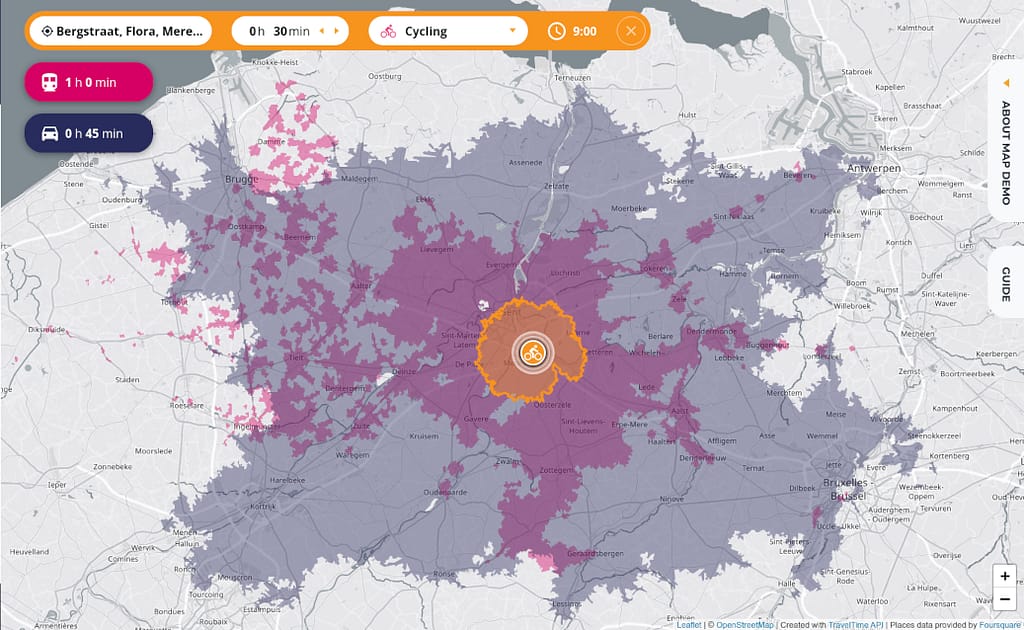
This is a map I made with the following data:

  • Yellow: reachable by cycling in 30 minutes or less. That’s about all of the city center of Ghent.
  • Red: reachable by public transport in 1 hour or less. That doesn’t get me to Antwerp, Mechelen or Kortrijk, but Brussels and Bruges are just about reachable.
  • Blue: reachable by car in 45 minutes or less. That barely touches Antwerp. Brussels: the north, west and south edges. Kortrijk and Bruges are also within reach. Why the cutoff at 45 minutes? Well, I would need really, really good other motivations to consider Brussels. Some time ago I thought that 30 minutes would be my maximum, but it isn’t. I’d rather call it an optimum than a maximum.
TravelTime

Even with this map, I still have a personal bias. Most of my social life occurs somewhere in the triangle Ghent-Antwerp-Brussels. It becomes harder to do something after work when working in West-Flanders. It’s not a hard pass, just a preference.

I have more to tell on this topic, so I might update this blog post later.

Installing Ubuntu 20.04 LTS on 2011 MacBook Air

My laptop is a 2011 MacBook Air. I’m not a huge Apple fan, it’s just that at the time it had the most interesting hardware features compared to similar laptops. And it’s quite sturdy, so that’s nice.

Over the years I have experimented with installing Linux in parallel to the OS X operating system, but in the end I settled on installing my favorite Linux tools inside OS X using Homebrew, because having two different operating systems on one laptop was Too Much Effortโ„ข. In recent times Apple has decided, in it’s infinite wisdom (no sarcasm at all *cough*), that it will no longer provide operating system upgrades for older hardware. Okay, then. Lately the laptop had become slow as molasses anyway, so I decided to replace OS X entirely with Ubuntu. No more half measures! I chose 20.04 LTS for the laptop because reasons. ๐Ÿ™‚

The laptop was really slow…

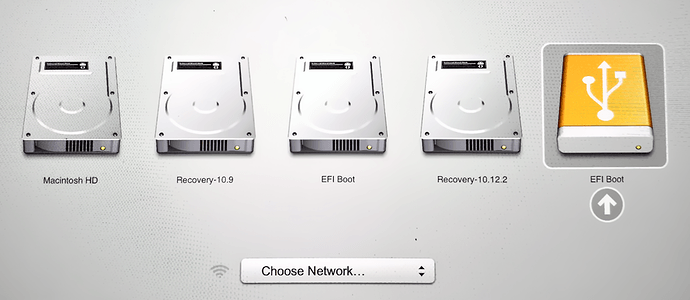
According to the Ubuntu Community Help Wiki, all hardware should be supported, except Thunderbolt. I don’t use anything Thunderbolt, so that’s OK for me. The installation was pretty straightforward: I just created a bootable USB stick and powered on the Mac with the Option/Alt (โŒฅ) key pressed. Choose EFI Boot in the Startup Manager, and from there on it’s all a typical Ubuntu installation.

screenshot
Startup Manager

I did not bother with any of the customizations described on the Ubuntu Wiki, because everything worked straight out of the box, and besides, the wiki is terribly outdated anyway.

The end result? I now have a laptop that feels snappy again, and that still gets updates for the operating system and the installed applications. And it’s my familiar Linux. What’s next? I’m thinking about using Ansible to configure the laptop.

To finish, I want to show you my sticker collection on the laptop. There’s still room for a lot more!

sticker collection on my laptop. Photo copyright: me.

Working abroad?

Occasionally (about 4% of people contacting me) I get a job offer for somewhere in another country.

This is a list of places outside of Belgium where people are apparently interested in having me. ๐Ÿ˜€

  • India (Hyderabad)
  • Germany (Berlin, Munich, Stuttgart, Wiesbaden)
  • United Kindom (London)
  • France (Paris)
  • Italy (Turin)
  • Spain (Madrid)
  • Poland
  • Netherlands (Amsterdam, Rotterdam, The Hague, Utrecht, Eindhoven, Groningen, Almere, Arnhem, Maastricht, Leiden, Deventer, Delft, Heerenveen)
  • Sweden (Stockholm)
  • Austria (Graz)
  • Switzerland (Zurich)
  • Norway (Stavanger)
  • Luxembourg (Luxembourg City, Pรฉtange)

I have never considered moving permanently to another country for work, and I wouldn’t feel comfortable to move to a country where I don’t speak the language. Even if the company language is English, I would still need to communicate with people in everyday life, for example going to the shop. So from the list above, only France and the Netherlands would remain.

Besides the language, there is still the matter of being cut off from the people who matter to me. Yes there is the internet, and during the pandemic there was virtually no other way to stay in touch, but still… it’s not the same. I already have some friends in the Netherlands, so (hypothetically) I would feel less alone there. But there are still plenty of interesting local companies to work for, so no thanks for now.

Have you ever been invited to work abroad? If yes, what was your motivation for doing so? What were your experiences? Feel free to share in the comments!

Thanks, but no thanks

After reading a few hundred emails from recruiters, I see a couple of trends popping up. I’m being contacted for job offers that really aren’t relevant or interesting for me. Some of them may be attributed to automatic keyword scanning. But still. If possible, I would kindly ask everyone not to contact me for any of the following:

  • Freelance: I have never done freelance before. Working freelance means that I would first have to start all the paperwork to become self-employed, and at this moment I’m not interested in doing all that. Maybe that could change in the faraway future, but at this point in my life I prefer permanent positions.
  • C/C++ embedded development: At one of my previous jobs, I did testing on the embedded software of a smart printer. Testing. Not development. I have never written a single line of C or C++ in my life. I would probably be able to read and understand other people’s code, but I’m sure that there are plenty of people who are really fluent in C/C++.
  • Drupal development: A long, long time ago, I made and maintained a few small Drupal sites. I have also been to one or two Drupal Dev Days in the early 2000s. I think I still have a T-shirt somewhere. But in all that time, I only did Drupal admin, I never went into the itty-gritty PHP to write custom Drupal code. And I’m pretty sure that my Drupal skills are quite rusty now.
  • Node.js development: Oh dear. I did a few tiny Node.js projects: some “glue code”, some rapid prototyping. Nothing fancy, nothing production quality, never more than 100 lines of code. Let’s not do that.
    EDIT 2021-10-25: I may have changed my opinion on this one! More about this in an upcoming blogpost.
    EDIT 2021-10-29: it’s online: What are my preferred roles.
  • SharePoint development: With the eternal words of William Shakespeare:

Fie on’t! ah fie! ’tis an unweeded garden,
That grows to seed; things rank and gross in nature
Possess it merely. That it should come to this!

Hamlet, Act I, Scene ii

  • Quality Control Operator: This is typically a case of blindly searching for keywords and not verifying the results. I have worked as a Software Quality Engineer, so if you search only for “quality”, you’ll end up with jobs where you do actual physical inspection of physical products. Rule of thumb: if I can’t test it with an Assert-statement in some kind of programming language, then it’s probably not the kind of “quality” that I’m looking for.
  • Production / “blue collar jobs”: Yeah well let’s not do that at all, shall we? With all due respect for the people who do this type of work, and some of it is really essential work, but I don’t think that this would ever make me happy.
  • First line tech support: Been there, done that, got the battle scars. Never again, thank you very much.

Benefits for not contacting me for any of these: you don’t waste time chasing a dead-end lead, and I can spend more time on reading and reacting to job offers that actually are relevant, interesting and even exciting. Everybody happy! ๐Ÿ™‚