So, you know that feeling when you’re editing GRUB for the thousandth time, because dual-booting is apparently a lifestyle choice?
In a previous post — Resurrecting My Windows Partition After 4 Years 🖥️🎮 — I was neck-deep in grub.cfg, poking at boot entries, fixing UUIDs, and generally performing a ritual worthy of system resurrection.
While I was at it, I decided to take a closer look at all those mysterious variables lurking in /etc/default/grub.
That’s when I stumbled upon something… magical. ✨
🎶 GRUB_INIT_TUNE — Your Bootloader Has a Voice
Hidden among all the serious-sounding options like GRUB_TIMEOUT and GRUB_CMDLINE_LINUX_DEFAULT sits this gem:
# Uncomment to get a beep at grub start
#GRUB_INIT_TUNE="480 440 1"
Wait, what? GRUB can beep?
Oh, not just beep. GRUB can play a tune. 🎺
Here’s how it actually works (per the GRUB manpage):
Format:
tempo freq duration [freq duration freq duration ...]
- tempo — The base time for all note durations, in beats per minute.
- 60 BPM → 1 second per beat
- 120 BPM → 0.5 seconds per beat
- freq — The note frequency in hertz.
- 262 = Middle C, 0 = silence
- duration — Measured in “bars” relative to the tempo.
- With tempo 60,
1= 1 second,2= 2 seconds, etc.
- With tempo 60,
So 480 440 1 is basically GRUB saying “Hello, world!” through your motherboard speaker: 0.25 seconds at 440 Hz, which is A4 in standard concert pitch as defined by ISO 16:1975.
And yes, this works even before your sound card drivers have loaded — pure, raw, BIOS-level nostalgia.
🧠 From Beep to Bop
Naturally, I couldn’t resist. One line turned into a small Python experiment, which turned into an audio preview tool, which turned into… let’s say, “bootloader performance art.”
Want to make GRUB play a polska when your system starts?
You can. It’s just a matter of string length — and a little bit of mischief. 😏
There’s technically no fixed “maximum size” for GRUB_INIT_TUNE, but remember: the bootloader runs in a very limited environment. Push it too far, and your majestic overture becomes a segmentation fault sonata.
So maybe keep it under a few kilobytes unless you enjoy debugging hex dumps at 2 AM.
🎼 How to Write a Tune That Won’t Make Your Laptop Cry
Practical rules of thumb (don’t be that person):
- Keep the inline tune under a few kilobytes if you want it to behave predictably.
- Hundreds to a few thousands of notes is usually fine; tens of thousands is pushing luck.
- Each numeric value (pitch or duration) must be ≤ 65535.
- Very long tunes simply delay the menu — that’s obnoxious for you and terrifying for anyone asking you for help.
Keep tunes short and tasteful (or obnoxious on purpose).
🎵 Little Musical Grammar: Notes, Durations and Chords (Fake Ones)
Write notes as frequency numbers (Hz). Example: A4 = 440.
Prefer readable helpers: write a tiny script that converts D4 F#4 A4 into the numbers.
Example minimal tune:
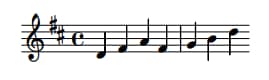
GRUB_INIT_TUNE="480 294 1 370 1 440 1 370 1 392 1 494 1 294 1"
That’ll give you a jaunty, bouncy opener — suitable for mild neighbour complaints. 💃🎻
Chords? GRUB can’t play them simultaneously — but you can fake them by rapid time-multiplexing (cycling the chord notes quickly).
It sounds like a buzzing organ, not a symphony, but it’s delightful in small doses.
Fun fact 💾: this time-multiplexing trick isn’t new — it’s straight out of the 8-bit video game era.
Old sound chips (like those in the Commodore 64 and NES) used the same sleight of hand to make
a single channel pretend to play multiple notes at once.
If you’ve ever heard a chiptune shimmer with impossible harmonies, that’s the same magic. ✨🎮
🧰 Tools I Like (and That You Secretly Want)
If you’re not into manually counting numbers, do this:
Use a small composer script (I wrote one) that:
- Accepts melodic notation like
D4 F#4 A4orC4+E4+G4(chord syntax). - Can preview via your system audio (so you don’t have to reboot to hear it).
- Can install the result into
/etc/default/gruband runupdate-grub(only as sudo).
Preview before you install. Always.
Your ears will tell you if your “ode to systemd” is charming or actually offensive.
For chords, the script time-multiplexes: e.g. for a 500 ms chord and 15 ms slices,
it cycles the chord notes quickly so the ear blends them.
It’s not true polyphony, but it’s a fun trick.
(If you want the full script I iterated on: drop me a comment. But it’s more fun to leave as an exercise to the reader.)
🧮 Limits, Memory, and “How Big Before It Breaks?”
Yes, my Red Team colleague will love this paragraph — and no, I’m not going to hand over a checklist for breaking things.
Short answer: GRUB doesn’t advertise a single fixed limit for GRUB_INIT_TUNE length.
Longer answer, responsibly phrased:
- Numeric limits: per note pitch/duration ≤ 65535 (
uint16_t). - Tempo: can go up to
uint32_t. - Parser & memory: the tune is tokenized at boot, so parsing buffers and allocators impose practical limits.
Expect a few kilobytes to be safe; hundreds of kilobytes is where things get flaky. - Usability: if your tune is measured in minutes, you’ve already lost. Don’t be that.
If you want to test where the parser chokes, do it in a disposable VM, never on production hardware.
If you’re feeling brave, you can even audit the GRUB source for buffer sizes in your specific version. 🧩
⚙️ How to Make It Sing
Edit /etc/default/grub and add a line like this:
GRUB_INIT_TUNE="480 440 1 494 1 523 1 587 1 659 3"
Then rebuild your config:
sudo update-grub
Reboot, and bask in the glory of your new startup sound.
Your BIOS will literally play you in. 🎶
💡 Final Thoughts
GRUB_INIT_TUNE is the operating-system equivalent of a ringtone for your toaster:
ridiculously low fidelity, disproportionately satisfying,
and a perfect tiny place to inject personality into an otherwise beige boot.
Use it for a smile, not for sabotage.
And just when I thought I’d been all clever reverse-engineering GRUB beeps myself…
I discovered that someone already built a web-based GRUB tune tester!
👉 https://breadmaker.github.io/grub-tune-tester/
Yes, you can compose and preview tunes right in your browser —
no need to sacrifice your system to the gods of early boot audio.
It’s surprisingly slick.
Even better, there’s a small but lively community posting their GRUB masterpieces on Reddit and other forums.
From Mario theme beeps to Doom startup riffs, there’s something both geeky and glorious about it.
You’ll find everything from tasteful minimalist dings to full-on “someone please stop them” anthems. 🎮🎶
Boot loud, boot proud — but please boot considerate. 😄🎻💻