Skip to content

Amedee

Safer Commands with argv in Ansible: Pros, Cons, and Real Examples

When using Ansible to automate tasks, the command module is your bread and butter for executing system commands. But did you know that there’s a safer, cleaner, and more predictable way to pass arguments? Meet argvโ€”an alternative to writing commands as strings.

In this post, Iโ€™ll explore the pros and cons of using argv, and Iโ€™ll walk through several real-world examples tailored to web servers and mail servers.


Why Use argv Instead of a Command String?

โœ… Pros

  • Avoids Shell Parsing Issues: Each argument is passed exactly as intended, with no surprises from quoting or spaces.
  • More Secure: No shell = no risk of shell injection.
  • Clearer Syntax: Every argument is explicitly defined, improving readability.
  • Predictable: Behavior is consistent across different platforms and setups.

โŒ Cons

  • No Shell Features: You can’t use pipes (|), redirection (>), or environment variables like $HOME.
  • More Verbose: Every argument must be a separate list item. Itโ€™s explicit, but more to type.
  • Not for Shell Built-ins: Commands like cd, export, or echo with redirection won’t work.

Real-World Examples

Letโ€™s apply this to actual use cases.

๐Ÿ”ง Restarting Nginx with argv

- name: Restart Nginx using argv
  hosts: amedee.be
  become: yes
  tasks:
    - name: Restart Nginx
      ansible.builtin.command:
        argv:
          - systemctl
          - restart
          - nginx

๐Ÿ“ฌ Check Mail Queue on a Mail-in-a-Box Server

- name: Check Postfix mail queue using argv
  hosts: box.vangasse.eu
  become: yes
  tasks:
    - name: Get mail queue status
      ansible.builtin.command:
        argv:
          - mailq
      register: mail_queue

    - name: Show queue
      ansible.builtin.debug:
        msg: "{{ mail_queue.stdout_lines }}"

๐Ÿ—ƒ๏ธ Back Up WordPress Database

- name: Backup WordPress database using argv
  hosts: amedee.be
  become: yes
  vars:
    db_user: wordpress_user
    db_password: wordpress_password
    db_name: wordpress_db
  tasks:
    - name: Dump database
      ansible.builtin.command:
        argv:
          - mysqldump
          - -u
          - "{{ db_user }}"
          - -p{{ db_password }}
          - "{{ db_name }}"
          - --result-file=/root/wordpress_backup.sql

โš ๏ธ Avoid exposing credentials directlyโ€”use Ansible Vault instead.


Using argv with Interpolation

Ansible lets you use Jinja2-style variables ({{ }}) inside argv items.

๐Ÿ”„ Restart a Dynamic Service

- name: Restart a service using argv and variable
  hosts: localhost
  become: yes
  vars:
    service_name: nginx
  tasks:
    - name: Restart
      ansible.builtin.command:
        argv:
          - systemctl
          - restart
          - "{{ service_name }}"

๐Ÿ•’ Timestamped Backups

- name: Timestamped DB backup
  hosts: localhost
  become: yes
  vars:
    db_user: wordpress_user
    db_password: wordpress_password
    db_name: wordpress_db
  tasks:
    - name: Dump with timestamp
      ansible.builtin.command:
        argv:
          - mysqldump
          - -u
          - "{{ db_user }}"
          - -p{{ db_password }}
          - "{{ db_name }}"
          - --result-file=/root/wordpress_backup_{{ ansible_date_time.iso8601 }}.sql

๐Ÿงฉ Dynamic Argument Lists

Avoid join(' '), which collapses the list into a single string.

โŒ Wrong:

argv:
  - ls
  - "{{ args_list | join(' ') }}"  # BAD: becomes one long string

โœ… Correct:

argv: ["ls"] + args_list

Or if the length is known:

argv:
  - ls
  - "{{ args_list[0] }}"
  - "{{ args_list[1] }}"

๐Ÿ“ฃ Interpolation Inside Strings

- name: Greet with hostname
  hosts: localhost
  tasks:
    - name: Print message
      ansible.builtin.command:
        argv:
          - echo
          - "Hello, {{ ansible_facts['hostname'] }}!"


When to Use argv

โœ… Commands with complex quoting or multiple arguments
โœ… Tasks requiring safety and predictability
โœ… Scripts or binaries that take arguments, but not full shell expressions

When to Avoid argv

โŒ When you need pipes, redirection, or shell expansion
โŒ When you’re calling shell built-ins


Final Thoughts

Using argv in Ansible may feel a bit verbose, but it offers precision and security that traditional string commands lack. When you need reliable, cross-platform automation that avoids the quirks of shell parsing, argv is the better choice.

Prefer safety? Choose argv.
Need shell magic? Use the shell module.

Have a favorite argv trick or horror story? Drop it in the comments below.

๐ŸŽฃ The Curious Case of the Beg Bounty Bait โ€” or: Licence to Phish

Not every day do I get an email from a very serious security researcher, clearly a man on a mission to save the internet โ€” one vague, copy-pasted email at a time.

Hereโ€™s the message I received:

From: Peter Hooks <peterhooks007@gmail.com>
Subject: Security Vulnerability Disclosure

Hi Team,

Iโ€™ve identified security vulnerabilities in your app that may put users at risk. Iโ€™d like to report these responsibly and help ensure they are resolved quickly.

Please advise on your disclosure protocol, or share details if you have a Bug Bounty program in place.

Looking forward to your reply.

Best regards,
Peter Hooks

Right. Letโ€™s unpack this.


๐Ÿงฏ”Your App” โ€” What App?

I’m not a company. I’m not a startup. I’m not even a garage-based stealth tech bro.
I run a personal WordPress blog. Thatโ€™s it.

There is no โ€œapp.โ€ There are no โ€œusers at riskโ€ (unless you count me, and Iฬทฬ“ฬœโ€™ฬทฬ‹ฬ mฬดฬ“ฬช ฬดอฬนaฬธฬฝอ™lฬตฬฟฬฃrฬธฬฝอ‡eฬตฬˆอ–aฬถฬ‹อ–dฬตฬ‡อ“yฬดฬ‚ฬผ ฬดอ‚ฬ–bฬถฬ‹ฬ eฬถฬฬปyฬดอ„อ‡oฬธฬ’ฬฃnฬธฬฬฆdฬดฬ†ฬŸ ฬถอ’อ‰sฬถอ€อ…aฬถอ—ฬกvฬดอŠอ™iฬตฬŠอ–nฬตฬ†อ–gฬธฬ”ฬก).


๐Ÿ•ต๏ธโ€โ™‚๏ธ The Anatomy of a Beg Bounty Email

This little email ticks all the classic marks of what the security community affectionately calls a beg bounty โ€” someone scanning random domains, finding trivial or non-issues, and fishing for a payout.

Want to see how common this is? Check out:


๐Ÿ“ฎ My (Admittedly Snarky) Reply

I couldnโ€™t resist. Hereโ€™s the reply I sent:

Hi Peter,

Thanks for your email and your keen interest in my โ€œappโ€ โ€” spoiler alert: there isnโ€™t one. Just a humble personal blog here.

Your message hits all the classic marks of a beg bounty reconnaissance email:

  • โœ… Generic โ€œHi Teamโ€ greeting โ€” because who needs names?
  • โœ… Vague claims of โ€œsecurity vulnerabilitiesโ€ with zero specifics
  • โœ… Polite inquiry about a bug bounty program (spoiler: none here, James)
  • โœ… No proof, no details, just good old-fashioned mystery
  • โœ… Friendly tone crafted to reel in easy targets
  • โœ… Email address proudly featuring โ€œ007โ€ โ€” very covert ops of you

Bravo. You almost had me convinced.

Iโ€™ll be featuring this charming little interaction in a blog post soon โ€” starring you, of course. If you ever feel like upgrading from vague templates to actual evidence, Iโ€™m all ears. Until then, happy fishing!

Cheers,
Amedee


๐Ÿ˜ข No Reply

Sadly, Peter didnโ€™t write back.

No scathing rebuttal.
No actual vulnerabilities.
No awkward attempt at pivoting.
Just… silence.


#crying
#missionfailed


๐Ÿ›ก๏ธ A Note for Fellow Nerds

If youโ€™ve got a domain name, no matter how small, thereโ€™s a good chance youโ€™ll get emails like this.

Hereโ€™s how to handle them:

  • Stay calm โ€” most of these are low-effort probes.
  • Donโ€™t pay โ€” you owe nothing to random strangers on the internet.
  • Donโ€™t panic โ€” vague threats are just that: vague.
  • Do check your stuff occasionally for actual issues.
  • Bonus: write a blog post about it and enjoy the catharsis.

For more context on this phenomenon, donโ€™t miss:


๐Ÿงต tl;dr

If your โ€œsecurity researcherโ€:

  • doesnโ€™t say what they found,
  • doesnโ€™t mention your actual domain or service,
  • asks for a bug bounty up front,
  • signs with a Gmail address ending in 007…

โ€ฆitโ€™s probably not the start of a beautiful friendship.


Got a similar email? Want help crafting a reply thatโ€™s equally professional and petty?
Feel free to drop a comment or reach out โ€” Iโ€™ll even throw in a checklist.

Until then: stay patched, stay skeptical, and stay snarky. ๐Ÿ˜Ž

Creating 10 000 Random Files & Analyzing Their Size Distribution: Because Why Not? ๐Ÿง๐Ÿ’พ

Ever wondered what itโ€™s like to unleash 10 000 tiny little data beasts on your hard drive? No? Well, buckle up anyway โ€” because today, weโ€™re diving into the curious world of random file generation, and then nerding out by calculating their size distribution. Spoiler alert: itโ€™s less fun than it sounds. ๐Ÿ˜

Step 1: Letโ€™s Make Some Files… Lots of Them

Our goal? Generate 10 000 files filled with random data. But not just any random sizes โ€” we want a mean file size of roughly 68 KB and a median of about 2 KB. Sounds like a math puzzle? Thatโ€™s because it kind of is.

If you just pick file sizes uniformly at random, youโ€™ll end up with a median close to the mean โ€” which is boring. We want a skewed distribution, where most files are small, but some are big enough to bring that average up.

The Magic Trick: Log-normal Distribution ๐ŸŽฉโœจ

Enter the log-normal distribution, a nifty way to generate lots of small numbers and a few big ones โ€” just like real life. Using Pythonโ€™s NumPy library, we generate these sizes and feed them to good old /dev/urandom to fill our files with pure randomness.

Hereโ€™s the Bash script that does the heavy lifting:

#!/bin/bash

# Directory to store the random files
output_dir="random_files"
mkdir -p "$output_dir"

# Total number of files to create
file_count=10000

# Log-normal distribution parameters
mean_log=9.0  # Adjusted for ~68KB mean
stddev_log=1.5  # Adjusted for ~2KB median

# Function to generate random numbers based on log-normal distribution
generate_random_size() {
    python3 -c "import numpy as np; print(int(np.random.lognormal($mean_log, $stddev_log)))"
}

# Create files with random data
for i in $(seq 1 $file_count); do
    file_size=$(generate_random_size)
    file_path="$output_dir/file_$i.bin"
    head -c "$file_size" /dev/urandom > "$file_path"
    echo "Generated file $i with size $file_size bytes."
done

echo "Done. Files saved in $output_dir."

Easy enough, right? This creates a directory random_files and fills it with 10 000 files of sizes mostly small but occasionally wildly bigger. Donโ€™t blame me if your disk space takes a little hit! ๐Ÿ’ฅ

Step 2: Crunching Numbers โ€” The File Size Distribution ๐Ÿ“Š

Okay, youโ€™ve got the files. Now, what can we learn from their sizes? Letโ€™s find out the:

  • Mean size: The average size across all files.
  • Median size: The middle value when sizes are sorted โ€” because averages can lie.
  • Distribution breakdown: How many tiny files vs. giant files.

Hereโ€™s a handy Bash script that reads file sizes and spits out these stats with a bit of flair:

#!/bin/bash

# Input directory (default to "random_files" if not provided)
directory="${1:-random_files}"

# Check if directory exists
if [ ! -d "$directory" ]; then
    echo "Directory $directory does not exist."
    exit 1
fi

# Array to store file sizes
file_sizes=($(find "$directory" -type f -exec stat -c%s {} \;))

# Check if there are files in the directory
if [ ${#file_sizes[@]} -eq 0 ]; then
    echo "No files found in the directory $directory."
    exit 1
fi

# Calculate mean
total_size=0
for size in "${file_sizes[@]}"; do
    total_size=$((total_size + size))
done
mean=$((total_size / ${#file_sizes[@]}))

# Calculate median
sorted_sizes=($(printf '%s\n' "${file_sizes[@]}" | sort -n))
mid=$(( ${#sorted_sizes[@]} / 2 ))
if (( ${#sorted_sizes[@]} % 2 == 0 )); then
    median=$(( (sorted_sizes[mid-1] + sorted_sizes[mid]) / 2 ))
else
    median=${sorted_sizes[mid]}
fi

# Display file size distribution
echo "File size distribution in directory $directory:"
echo "---------------------------------------------"
echo "Number of files: ${#file_sizes[@]}"
echo "Mean size: $mean bytes"
echo "Median size: $median bytes"

# Display detailed size distribution (optional)
echo
echo "Detailed distribution (size ranges):"
awk '{
    if ($1 < 1024) bins["< 1 KB"]++;
    else if ($1 < 10240) bins["1 KB - 10 KB"]++;
    else if ($1 < 102400) bins["10 KB - 100 KB"]++;
    else bins[">= 100 KB"]++;
} END {
    for (range in bins) printf "%-15s: %d\n", range, bins[range];
}' <(printf '%s\n' "${file_sizes[@]}")

Run it, and voilร  โ€” instant nerd satisfaction.

Example Output:

File size distribution in directory random_files:
---------------------------------------------
Number of files: 10000
Mean size: 68987 bytes
Median size: 2048 bytes

Detailed distribution (size ranges):
&lt; 1 KB         : 1234
1 KB - 10 KB   : 5678
10 KB - 100 KB : 2890
>= 100 KB      : 198

Why Should You Care? ๐Ÿคทโ€โ™€๏ธ

Besides the obvious geek cred, generating files like this can help:

  • Test backup systems โ€” can they handle weird file size distributions?
  • Stress-test storage or network performance with real-world-like data.
  • Understand your data patterns if youโ€™re building apps that deal with files.

Wrapping Up: Big Files, Small Files, and the Chaos In Between

So there you have it. Ten thousand random files later, and weโ€™ve peeked behind the curtain to understand their size story. Itโ€™s a bit like hosting a party and then figuring out who ate how many snacks. ๐Ÿฟ

Try this yourself! Tweak the distribution parameters, generate files, crunch the numbers โ€” and impress your friends with your mad scripting skills. Or at least have a fun weekend project that makes you sound way smarter than you actually are.

Happy hacking! ๐Ÿ”ฅ

How I Tamed Duplicityโ€™s Buggy Versions โ€” and Made Sure I Always Have a Backup ๐Ÿ›ก๏ธ๐Ÿ’พ

If youโ€™re running Mail-in-a-Box like me, you might rely on Duplicity to handle backups quietly in the background. Itโ€™s a great tool โ€” until it isnโ€™t. Recently, I ran into some frustrating issues caused by buggy Duplicity versions. Hereโ€™s the story, a useful discussion from the Mail-in-a-Box forums, and a neat trick I use to keep fallback versions handy. Spoiler: it involves an APT hook and some smart file copying! ๐Ÿš€


The Problem with Duplicity Versions

Duplicity 3.0.1 and 3.0.5 have been reported to cause backup failures โ€” a real headache when you depend on them to protect your data. The Mail-in-a-Box forum post โ€œSomething is wrong with the backupโ€ dives into these issues with great detail. Users reported mysterious backup failures and eventually traced it back to specific Duplicity releases causing the problem.

Hereโ€™s the catch: those problematic versions sometimes sneak in during automatic updates. By the time you realize somethingโ€™s wrong, you might already have upgraded to a buggy release. ๐Ÿ˜ฉ


Pinning Problematic Versions with APT Preferences

One way to stop apt from installing those broken versions is to use APT pinning. Hereโ€™s an example file I created in /etc/apt/preferences/pin_duplicity.pref:

Explanation: Duplicity version 3.0.1* has a bug and should not be installed
Package: duplicity
Pin: version 3.0.1*
Pin-Priority: -1

Explanation: Duplicity version 3.0.5* has a bug and should not be installed
Package: duplicity
Pin: version 3.0.5*
Pin-Priority: -1

This tells apt to refuse to install these specific buggy versions. Sounds great, right? Except โ€” it often comes too late. You could already have updated to a broken version before adding the pin.

Also, since Duplicity is installed from a PPA, older versions vanish quickly as new releases push them out. This makes rolling back to a known good version a pain. ๐Ÿ˜ค


My Solution: Backing Up Known Good Duplicity .deb Files Automatically

To fix this, I created an APT hook that runs after every package operation involving Duplicity. It automatically copies the .deb package files of Duplicity from aptโ€™s archive cache โ€” and even from my local folder if Iโ€™m installing manually โ€” into a safe backup folder.

Hereโ€™s the script, saved as /usr/local/bin/apt-backup-duplicity.sh:

#!/bin/bash
set -x

mkdir -p /var/backups/debs/duplicity

cp -vn /var/cache/apt/archives/duplicity_*.deb /var/backups/debs/duplicity/ 2>/dev/null || true
cp -vn /root/duplicity_*.deb /var/backups/debs/duplicity/ 2>/dev/null || true

And hereโ€™s the APT hook configuration I put in /etc/apt/apt.conf.d/99backup-duplicity-debs to run this script automatically after DPKG operations:

DPkg::Post-Invoke { "/usr/local/bin/apt-backup-duplicity.sh"; };

Use apt-mark hold to Lock a Working Duplicity Version ๐Ÿ”’

Even with pinning and local .deb backups, there’s one more layer of protection I recommend: freezing a known-good version with apt-mark hold.

Once you’ve confirmed that your current version of Duplicity works reliably, run:

sudo apt-mark hold duplicity

This tells apt not to upgrade Duplicity, even if a newer version becomes available. Itโ€™s a great way to avoid accidentally replacing your working setup with something buggy during routine updates.

๐Ÿง  Pro Tip: I only unhold and upgrade Duplicity manually after checking the Mail-in-a-Box forum for reports that a newer version is safe.

When you’re ready to upgrade, do this:

sudo apt-mark unhold duplicity
sudo apt update
sudo apt install duplicity

If everything still works fine, you can apt-mark hold it again to freeze the new version.


How to Use Your Backup Versions to Roll Back

If a new Duplicity version breaks your backups, you can easily reinstall a known-good .deb file from your backup folder:

sudo apt install --reinstall /var/backups/debs/duplicity/duplicity_<version>.deb

Replace <version> with the actual filename you want to roll back to. Because you saved the .deb files right after each update, you always have access to older stable versions โ€” even if the PPA has moved on.


Final Thoughts

While pinning bad versions helps, having a local stash of known-good packages is a game changer. Add apt-mark hold on top of that, and you have a rock-solid defense against regressions. ๐Ÿชจโœจ

Itโ€™s a small extra step but pays off hugely when things go sideways. Plus, itโ€™s totally automated with the APT hook, so you donโ€™t have to remember to save anything manually. ๐ŸŽ‰

If you run Mail-in-a-Box or rely on Duplicity in any critical backup workflow, I highly recommend setting up this safety net.

Stay safe and backed up! ๐Ÿ›ก๏ธโœจ

๐Ÿงฑ Letโ€™s Get Hard (Links): Deduplicating My Linux Filesystem with Hadori

File deduplication isnโ€™t just for massive storage arrays or backup systemsโ€”it can be a practical tool for personal or server setups too. In this post, Iโ€™ll explain how I use hardlinking to reduce disk usage on my Linux system, which directories are safe (and unsafe) to link, why Iโ€™m OK with the trade-offs, and how I automated it with a simple monthly cron job using a neat tool called hadori.


๐Ÿ”— What Is Hardlinking?

In a traditional filesystem, every file has an inode, which is essentially its real identityโ€”the data on disk. A hard link is a different filename that points to the same inode. That means:

  • The file appears to exist in multiple places.
  • But there’s only one actual copy of the data.
  • Deleting one link doesnโ€™t delete the content, unless itโ€™s the last one.

Compare this to a symlink, which is just a pointer to a path. A hardlink is a pointer to the data.

So if you have 10 identical files scattered across the system, you can replace them with hardlinks, and boomโ€”nine of them stop taking up extra space.


๐Ÿค” Why Use Hardlinking?

My servers run a fairly standard Ubuntu install, and like most Linux machines, the root filesystem accumulates a lot of identical binaries and librariesโ€”especially across /bin, /lib, /usr, and /opt.

Thatโ€™s not a problemโ€ฆ until you’re tight on disk space, or youโ€™re just a curious nerd who enjoys squeezing every last byte.

In my case, I wanted to reduce disk usage safely, without weird side effects.

Hardlinking is a one-time cost with ongoing benefits. Itโ€™s not compression. Itโ€™s not archival. But itโ€™s efficient and non-invasive.


๐Ÿ“ Which Directories Are Safe to Hardlink?

Hardlinking only works within the same filesystem, and not all directories are good candidates.

โœ… Safe directories:

  • /bin, /sbin โ€“ system binaries
  • /lib, /lib64 โ€“ shared libraries
  • /usr, /usr/bin, /usr/lib, /usr/share, /usr/local โ€“ user-space binaries, docs, etc.
  • /opt โ€“ optional manually installed software

These contain mostly static files: compiled binaries, libraries, man pagesโ€ฆ not something that changes often.

โš ๏ธ Unsafe or risky directories:

  • /etc โ€“ configuration files, might change frequently
  • /var, /tmp โ€“ logs, spools, caches, session data
  • /home โ€“ user files, temporary edits, live data
  • /dev, /proc, /sys โ€“ virtual filesystems, do not touch

If a file is modified after being hardlinked, it breaks the deduplication (the OS creates a copy-on-write scenario), and youโ€™re back where you startedโ€”or worse, sharing data you didnโ€™t mean to.

Thatโ€™s why I avoid any folders with volatile, user-specific, or auto-generated files.


๐Ÿงจ Risks and Limitations

Hardlinking is not magic. It comes with sharp edges:

  • One inode, multiple names: All links are equal. Editing one changes the data for all.
  • Backups: Some backup tools donโ€™t preserve hardlinks or treat them inefficiently.
    โžค Duplicity, which I use, does not preserve hardlinks. It backs up each linked file as a full copy, so hardlinking wonโ€™t reduce backup size.
  • Security: Linking files with different permissions or owners can have unexpected results.
  • Limited scope: Only works within the same filesystem (e.g., canโ€™t link / and /mnt if theyโ€™re on separate partitions).

In my setup, I accept those risks because:

  • I’m only linking read-only system files.
  • I never link config or user data.
  • I donโ€™t rely on hardlink preservation in backups.
  • I test changes before deploying.

In short: I know what Iโ€™m linking, and why.


๐Ÿ” What the Critics Say About Hardlinking

Not everyone loves hardlinksโ€”and for good reasons. Two thoughtful critiques are:

The core arguments:

  • Hardlinks violate expectations about file ownership and identity.
  • They can break assumptions in software that tracks files by name or path.
  • They complicate file deletion logicโ€”deleting one name doesn’t delete the content.
  • They confuse file monitoring and logging tools, since itโ€™s hard to tell if a file is “new” or just another name.
  • They increase the risk of data corruption if accidentally modified in-place by a script that assumes it owns the file.

Why Iโ€™m still OK with it:

These concerns are validโ€”but mostly apply to:

  • Mutable files (e.g., logs, configs, user data)
  • Systems with untrusted users or dynamic scripts
  • Software that relies on inode isolation or path integrity

In contrast, my approach is intentionally narrow and safe:

  • I only deduplicate read-only system files in /bin, /sbin, /lib, /lib64, /usr, and /opt.
  • These are owned by root, and only changed during package updates.
  • I donโ€™t hardlink anything under /home, /etc, /var, or /tmp.
  • I know exactly when the cron job runs and what it targets.

So yes, hardlinks can be dangerousโ€”but only if you use them in the wrong places. In this case, I believe Iโ€™m using them correctly and conservatively.


โšก Does Hardlinking Impact System Performance?

Good news: hardlinks have virtually no impact on system performance in everyday use.

Hardlinks are a native feature of Linux filesystems like ext4 or xfs. The OS treats a hardlinked file just like a normal file:

  • Reading and writing hardlinked files is just as fast as normal files.
  • Permissions, ownership, and access behave identically.
  • Common tools (ls, cat, cp) donโ€™t care whether a file is hardlinked or not.
  • Filesystem caches and memory management work exactly the same.

The only difference is that multiple filenames point to the exact same data.

Things to keep in mind:

  • If you edit a hardlinked file, all links see that change because thereโ€™s really just one file.
  • Some tools (backup, disk usage) might treat hardlinked files differently.
  • Debugging or auditing files can be slightly trickier since multiple paths share one inode.

But from a performance standpoint? Your system wonโ€™t even notice the difference.


๐Ÿ› ๏ธ Tools for Hardlinking

There are a few tools out there:

  • fdupes โ€“ finds duplicates and optionally replaces with hardlinks
  • rdfind โ€“ more sophisticated detection
  • hardlink โ€“ simple but limited
  • jdupes โ€“ high-performance fork of fdupes

๐Ÿ“Œ About Hadori

From the Debian package description:

This might look like yet another hardlinking tool, but it is the only one which only memorizes one filename per inode. That results in less memory consumption and faster execution compared to its alternatives. Therefore (and because all the other names are already taken) it’s called “Hardlinking DOne RIght”.

Advantages over other tools:

  • Predictability: arguments are scanned in order, each first version is kept
  • Much lower CPU and memory consumption compared to alternatives

This makes hadori especially suited for system-wide deduplication where efficiency and reliability matter.


โฑ๏ธ How I Use Hadori

I run hadori once per month with a cron job. Hereโ€™s the actual command:

/usr/bin/hadori --verbose /bin /sbin /lib /lib64 /usr /opt

This scans those directories, finds duplicate files, and replaces them with hardlinks when safe.

And hereโ€™s the crontab entry I installed in the file /etc/cron.d/hadori:

@monthly root /usr/bin/hadori --verbose /bin /sbin /lib /lib64 /usr /opt

๐Ÿ“‰ What Are the Results?

After the first run, I saw a noticeable reduction in used disk space, especially in /usr/lib and /usr/share. On my modest VPS, that translated to about 300โ€“500 MB savedโ€”not huge, but non-trivial for a small root partition.

While this doesnโ€™t reduce my backup size (Duplicity doesnโ€™t support hardlinks), it still helps with local disk usage and keeps things a little tidier.

And because the job only runs monthly, itโ€™s not intrusive or performance-heavy.


๐Ÿงผ Final Thoughts

Hardlinking isnโ€™t something most people need to think about. And frankly, most people probably shouldnโ€™t use it.

But if you:

  • Know what youโ€™re linking
  • Limit it to static, read-only system files
  • Automate it safely and sparingly

โ€ฆthen it can be a smart little optimization.

With a tool like hadori, itโ€™s safe, fast, and efficient. Iโ€™ve read the horror storiesโ€”and decided that in my case, they donโ€™t apply.


โœ‰๏ธ This post was brought to you by a monthly cron job and the letters i-n-o-d-e.

๐Ÿ” How I Accidentally Discovered Power Query

A few weeks ago, I was knee-deep in CSV files. Not the fun kind. These were automatically generated reports from Cisco IronPort, and they werenโ€™t exactly what Iโ€™d call analysis-friendly. Think: dozens of columns wide, thousands of rows, with summary data buried in awkward corners.

I was trying to make sense of incoming mail categoriesโ€”Spam, Clean, Malwareโ€”and the numbers that went with them. Naturally, I opened the file in Excel, intending to wrangle the data manually like I usually do. You know: transpose the table, delete some columns, rename a few headers, calculate percentagesโ€ฆ the usual grunt work.

But something was different this time. I noticed the โ€œGet & Transformโ€ section in Excelโ€™s Data ribbon. I had clicked it before, but this time I gave it a real shot. I selected โ€œFrom Text/CSVโ€, and suddenly I was in a whole new environment: Power Query Editor.


๐Ÿคฏ Wait, What Is Power Query?

For those who havenโ€™t met it yet, Power Query is a powerful tool in Excel (and also in Power BI) that lets you import, clean, transform, and reshape data before it even hits your spreadsheet. It uses a language called M, but you donโ€™t really have to write codeโ€”although I quickly did, of course, because I canโ€™t help myself.

In the editor, every transformation step is recorded. You can rename columns, remove rows, change data types, calculate new columnsโ€”all through a clean interface. And once youโ€™re done, you just load the result into Excel. Even better: you can refresh it with one click when the source file updates.


๐Ÿงช From Curiosity to Control

Back to my IronPort report. I used Power Query to:

  • Transpose the data (turn columns into rows),
  • Remove columns I didnโ€™t need,
  • Rename columns to something meaningful,
  • Convert text values to numbers,
  • Calculate the percentage of each message category relative to the total.

All without touching a single cell in Excel manually. What would have taken 15+ minutes and been error-prone became a repeatable, refreshable process. I even added a โ€œPercentโ€ column that showed something like 53.4%โ€”formatted just the way I wanted.


๐Ÿค“ The Geeky Bit (Optional)

I quickly opened the Advanced Editor to look at the underlying M code. It was readable! With a bit of trial and error, I started customizing my steps, renaming variables for clarity, and turning a throwaway transformation into a well-documented process.

This was the moment it clicked: Power Query is not just a tool; itโ€™s a pipeline.


๐Ÿ’ก Lessons Learned

  • Sometimes it pays to explore what’s already in the software you use every day.
  • Excel is much more powerful than most people realize.
  • Power Query turns tedious cleanup work into something maintainable and even elegant.
  • If you do something in Excel more than once, Power Query is probably the better way.

๐ŸŽฏ Whatโ€™s Next?

Iโ€™m already thinking about integrating this into more of my work. Whether it’s cleaning exported logs, combining reports, or prepping data for dashboards, Power Query is now part of my toolkit.

If youโ€™ve never used it, give it a try. You might accidentally discover your next favorite toolโ€”just like I did.


Have you used Power Query before? Let me know your tips or war stories in the comments!

In Defense of the Em Dash โ€” A Beautiful Line of Thought โœ๏ธ

Lately, Iโ€™ve noticed something strange happening in online discussions: the humble em dash (โ€”) is getting side-eyed as a telltale sign that a text was written with a so-called โ€œAI.โ€ I prefer the more accurate term: LLM (Large Language Model), because โ€œartificial intelligenceโ€ is a bit of a stretch โ€” weโ€™re really just dealing with very complicated statistics ๐Ÿค–๐Ÿ“Š.

Now, I get it โ€” people are on high alert, trying to spot generated content. But Iโ€™d like to take a moment to defend this elegant punctuation mark, because I use it often โ€” and deliberately. Not because a machine told me to, but because it helps me think ๐Ÿง .

A Typographic Tool, Not a Trend ๐Ÿ–‹๏ธ

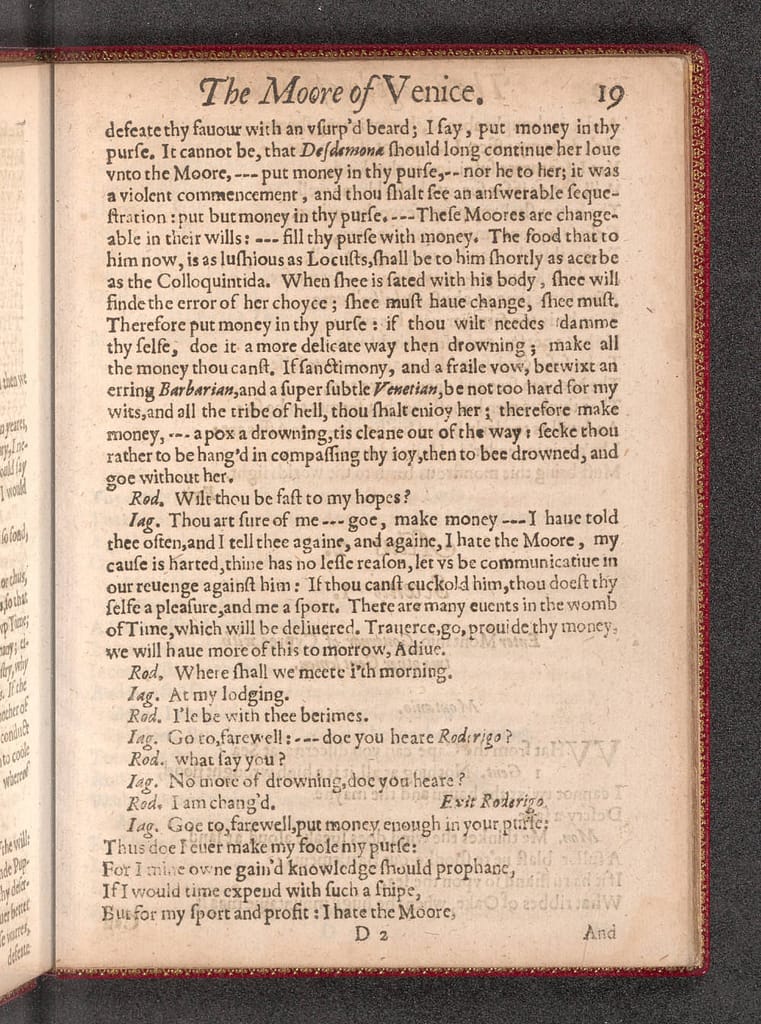
The em dash has been around for a long time โ€” longer than most people realize. The oldest printed examples Iโ€™ve found are in early 17th-century editions of Shakespeareโ€™s plays, published by the printer Okes in the 1620s. Thatโ€™s not just a random dash on a page โ€” thatโ€™s four hundred years of literary service ๐Ÿ“œ. If Shakespeareโ€™s typesetters were using em dashes before indoor plumbing was common, I think itโ€™s safe to say theyโ€™re not a 21st-century LLM quirk.

The Tragedy of Othello, the Moor of Venice, with long dashes (typeset here with 3 dashes)

A Dash for Thoughts ๐Ÿ’ญ

In Dutch, the em dash is called a gedachtestreepje โ€” literally, a thought dash. And honestly? I think thatโ€™s beautiful. It captures exactly what the em dash does: it opens a little mental window in your sentence. It lets you slip in a side note, a clarification, an emotion, or even a complete detour โ€” just like a sudden thought that needs to be spoken before it disappears. For someone like me, who often thinks in tangents, itโ€™s the perfect punctuation.

Why I Use the Em Dash (And Other Punctuation Marks)

Iโ€™m autistic, and that means a few things for how I write. I tend to overshare and infodump โ€” not to dominate the conversation, but to make sure everything is clear. I donโ€™t like ambiguity. I donโ€™t want anyone to walk away confused. So I reach for whatever punctuation tools help me shape my thoughts as precisely as possible:

  • Colons help me present information in a tidy list โ€” like this one.
  • Brackets let me add little clarifications (without disrupting the main sentence).
  • And em dashes โ€” ah, the em dash โ€” they let me open a window mid-sentence to give you extra context, a bit of tone, or a change in pace.

Theyโ€™re not random. Theyโ€™re intentional. They reflect how my brain works โ€” and how I try to bridge the gap between thoughts and words ๐ŸŒ‰.

Itโ€™s Not Just a Line โ€” Itโ€™s a Rhythm ๐ŸŽต

Thereโ€™s also something typographically beautiful about the em dash. Itโ€™s not a hyphen (-), and itโ€™s not a middling en dash (โ€“). Itโ€™s long and confident. It creates space for your eyes and your thoughts. Used well, it gives writing a rhythm that mimics natural speech, especially the kind of speech where someone is passionate about a topic and wants to take you on a detour โ€” just for a moment โ€” before coming back to the main road ๐Ÿ›ค๏ธ.

Iโ€™m that someone.

Donโ€™t Let the Bots Scare You

Yes, LLMs tend to use em dashes. So do thoughtful human beings. Letโ€™s not throw centuries of stylistic nuance out the window because a few bots learned how to mimic good writing. Instead of scanning for suspicious punctuation, maybe we should pay more attention to whatโ€™s being said โ€” and how intentionally ๐Ÿ’ฌ.

So if you see an em dash in my writing, donโ€™t assume it came from a machine. It came from me โ€” my mind, my style, my history with language. And Iโ€™m not going to stop using it just because an algorithm picked up the habit ๐Ÿ’›.

Help ons zoeken: drie mensen op zoek naar een warm huis in Gent

Soms zit het mee, soms nรฉt niet. Het herenhuis waar we helemaal verliefd op waren, is helaas aan iemand anders verhuurd. Jammer, maar we blijven niet bij de pakken zitten. We zoeken verder โ€” en hopelijk kan jij ons daarbij helpen!

Wij zijn drie mensen die samen een huis willen delen in Gent. We vormen een warme, bewuste en respectvolle woongroep, en we dromen van een plek waar we rust, verbinding en creativiteit kunnen combineren.

Wie zijn wij?

๐Ÿ‘ค Amedee (48): ITโ€™er, balfolkdanser, amateurmuzikant, houdt van gezelschapsspelletjes en wandelen, auti en sociaal geรซngageerd
๐Ÿ‘ฉ Chloรซ (bijna 52): Kunstenares, ex-Waldorfleerkracht en permacultuurontwerpster, houdt van creativiteit, koken en natuur
๐ŸŽจ Kathleen (54): Doodle-artiest met sociaal-culturele achtergrond, houdt van gezelligheid, buiten zijn en schrijft graag

We willen samen een huis vormen waar communicatie, zorgzaamheid en vrijheid centraal staan. Een plek waar je je thuis voelt, en waar ruimte is voor kleine activiteiten zoals een spelavond, een workshop, een creatieve sessie of gewoon rustig samen zijn.

Wat zoeken we?

๐Ÿก Een huis (gรฉรฉn appartement) in Gent, op max. 15 minuten fietsen van station Gent-Sint-Pieters
๐ŸŒฟ Energiezuinig: EPC B of beter
๐Ÿ› Minstens 3 ruime slaapkamers van ยฑ20mยฒ
๐Ÿ’ถ Huurprijs:

  • tot โ‚ฌ1650/maand voor 3 slaapkamers
  • tot โ‚ฌ2200/maand voor 4 slaapkamers

Extra ruimtes zoals een zolder, logeerkamer, atelier, bureau of hobbyruimte zijn heel welkom. We houden van luchtige, multifunctionele plekken die mee kunnen groeien met onze noden.

๐Ÿ“… Beschikbaar: vanaf nu, ten laatste oktober

๐Ÿ’ฌ Heeft het huis 4 slaapkamers? Dan verwelkomen we graag een vierde huisgenoot die onze waarden deelt. Maar meer dan 4 bewoners willen we bewust vermijden โ€” kleinschalig wonen werkt voor ons het best.

Ken jij iets? Laat van je horen!

Ken je een huis dat past in dit plaatje?
We staan open voor tips via immokantoren, vrienden, buren, collegaโ€™s of andere netwerken โ€” alles helpt!

๐Ÿ“ฉ Contact: amedee@vangasse.eu

Dankjewel om mee uit te kijken โ€” en delen mag altijd ๐Ÿ’œ

Samenwonen in Gent? Wij starten een nieuwe cohousing en zoeken nog iemand!

Heb jij altijd al willen samenwonen met fijne mensen in een warme, open en respectvolle sfeer? Dan is dit misschien wel iets voor jou.

Samen met twee vrienden ben ik een nieuwe cohousing aan het opstarten in Gent. We hebben een prachtig gerenoveerd herenhuis op het oog, en we zijn op zoek naar een vierde persoon om het huis mee te delen.

Het huis

Het gaat om een ruim en karaktervol herenhuis met energielabel B+. Het beschikt over:

Vier volwaardige slaapkamers van elk 18 ร  20 mยฒ

Eรฉn extra kamer die we kunnen inrichten als logeerkamer, bureau of hobbyruimte

Twee badkamers

Twee keukens

Een zolder met stevige balken โ€” de creatieve ideeรซn borrelen al op!


De ligging is uitstekend: aan de Koning Albertlaan, op amper 5 minuten fietsen van station Gent-Sint-Pieters en 7 minuten van de Korenmarkt. De huurprijs is โ‚ฌ2200 in totaal, wat neerkomt op โ‚ฌ550 per persoon bij vier bewoners.

Het huis is al beschikbaar vanaf 1 juli 2025.

Wie zoeken we?

We zoeken iemand die zich herkent in een aantal gedeelde waarden en graag deel uitmaakt van een respectvolle, open en bewuste leefomgeving. Concreet betekent dat voor ons:

Je staat open voor diversiteit in al haar vormen

Je bent respectvol, communicatief en houdt rekening met anderen

Je hebt voeling met themaโ€™s zoals inclusie, mentale gezondheid, en samenleven met aandacht voor elkaar

Je hebt een rustig karakter en draagt graag bij aan een veilige, harmonieuze sfeer in huis

Leeftijd is niet doorslaggevend, maar omdat we zelf allemaal 40+ zijn, zoeken we eerder iemand die zich in die levensfase herkent


Iets voor jou?

Voel je een klik met dit verhaal? Of heb je vragen en wil je ons beter leren kennen? Aarzel dan niet om contact op te nemen via amedee@vangasse.eu.

Is dit niets voor jou, maar ken je iemand die perfect zou passen in dit plaatje? Deel dan zeker deze oproep โ€” dank je wel!

Samen kunnen we van dit huis een warme thuis maken.

๐Ÿ“ฐ Featured by Sibelga and Passwerk: When Being Different Becomes a Strength

I am excited to share some wonderful newsโ€”Sibelga and Passwerk have recently published a testimonial about my work, and it has been shared across LinkedIn, Sibelga’s website, and even on YouTube!


What Is This All About?

Passwerk is an organisation that matches talented individuals on the autism spectrum with roles in IT and software testing, creating opportunities based on strengths and precision. I have been working with them as a consultant, currently placed at Sibelga, Brussels’ electricity and gas distribution network operator.

The article and video highlight how being โ€œdifferentโ€ does not have to be a limitationโ€”in fact, it can be a real asset in the right context. It means a lot to me to be seen and appreciated for who I am and the quality of my work.


Why This Matters

For many neurodivergent people, the professional world can be full of challenges that go beyond the work itself. Finding the right environmentโ€”one that values accuracy, focus, and dedicationโ€”can be transformative.

I am proud to be part of a story that shows what is possible when companies look beyond stereotypes and embrace neurodiversity as a strength.


Thank you to Sibelga, Passwerk, and everyone who contributed to this recognition. It is an honour to be featured, and I hope this story inspires more organisations to open up to diverse talents.

๐Ÿ‘‰ Want to know more? Check out the article or watch the video!